

Communication and Identification
 Vash
Vash(74 ratings)
Jan 26, 2025 @ 4:48pm2,31289
Gameplay BasicsEnglish
Communication 101
Communication is the key to Squad game play. If you are not hearing orders or understanding what is being said to you by who and from where you could be very lost. Here is how to understand what is going on in squad as you hear and see players speaking.
There are different channels or layers of Communication systems to squad lets go over then and how to interact with them.
Here is an on screen example of what you will see when players are speaking with the chat channels.
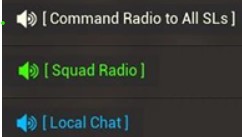 Command is White
Squad is Green
Local is Blue
Rule of thumb, try to keep squad comms clear for real information for the squad leader. For example if you are in a fire team and not the lead relay your info locally and let the fire team lead speak to the squad lead. In further sections we will talk about better ways of communicating through shorten verbalization.
During the game play of Squad you will hear a lot of phrases that are either shorthand or acronyms. This is meant to keep communications brief and to the point. No one needs cluttered up comms with a player trying to explain they are seeing an american tank rolling with 5 guys to point killing their squad for a full minuet in full gory detail. Instead use shorthand and acronyms to help you shorten your message. Check out the next sections for the common phrases, acronyms, and report request types you might hear.
There are different channels or layers of Communication systems to squad lets go over then and how to interact with them.
- Local Chat: Pressing the “V” button (by default) toggles the most useful for most in-game communication which allows information to be spread at a local level. For example "Grenade get down"! You would want all people in the local area to be aware of the danger.
- Squad Chat: Pressing the “B” button (by default) toggles squad communications for all members inside of your squad and only your squad. For example "Can we get a range mark on target." This is an action some of your squad mates can preform, depending on role.
- Command Chat: Pressing “G” button (by default) toggles command communications for all squad leaders and can only be used by squad leaders.
- Squad to Squad via Numpad: Pressing the corresponding number on the numpad to a given active squad will open a direct chat with them. For example if you need to speak to squad 3, press 3. Squad 5, press 5. Can only be used by squad leaders. (Note there are some visual bugs with this and it may appear incorrect, but it works correctly)
Here is an on screen example of what you will see when players are speaking with the chat channels.
Command is WhiteSquad is Green
Local is Blue
Rule of thumb, try to keep squad comms clear for real information for the squad leader. For example if you are in a fire team and not the lead relay your info locally and let the fire team lead speak to the squad lead. In further sections we will talk about better ways of communicating through shorten verbalization.
During the game play of Squad you will hear a lot of phrases that are either shorthand or acronyms. This is meant to keep communications brief and to the point. No one needs cluttered up comms with a player trying to explain they are seeing an american tank rolling with 5 guys to point killing their squad for a full minuet in full gory detail. Instead use shorthand and acronyms to help you shorten your message. Check out the next sections for the common phrases, acronyms, and report request types you might hear.
Common Phrases
- Radio: Forward Operating Base Creation point.
- Forward Operating Base: Area around radio to place spawn bunkers, ammo crate, ect.
- Rally: Portable spawn deploy-able by squad leader.
- Commander: Squad leader of the map that has deploy-able Strategic or Tactical Support Actions.
- Blueberry: Random teammate not in your squad.
- Tracked: Treads on a vehicle are destroyed and it cannot move.
- Proxied: Enemies are close to spawn point preventing spawning.
- Burn/Bleed: Radio is on count down to destruction
- Back-Cap: Capturing the first objectives on the map.
- Logi: Logistics truck.
- Logi-Run: Using a logistics truck to bring build supply or ammo to a given point.
- Dig Up: Using a shovel to build an object with left click.
- Dig Down: Using a shovel to destroy an object with right click.
- Half and Half: The state of a vehicle having half ammo and half build supply in it's storage.
- Bearing: Compass orientation number.
- Double Neutral: Two consecutive objectives neutralized.
- Tactical Request: A squad leader placed a marker for Commander assets.
- Artillery / Airstrike: Commander placed fire support missions
- Drone / UAV: Unmanned Ariel Vehicle, deploy-able by Commander.
- Fitty: .50 caliber machine gun.
- Roger: A phonetic term used to indicate that a message has been received and understood
- Wilco: Short for "will comply," this is used to indicate that an order has been understood and will be carried out
- Mike: A slang term used to mean "a minute".
- Charlie Mike: Used to indicate that a mission should continue.
- Oscar Mike: Used to indicate that someone is on the move.
- Bravo Zulu: Used to indicate that someone has done a good job.
- November Golf: Used to indicate that something has failed or is a no go.
Common Acronyms
- FOB: Forward Operating Base
- HAB: Spawn build at FOB
- MSR: Main Supply route used for supply and ammo delivery.
- SL: Squad Leader
- FTL: Fire Team Lead
- LAT: Light Anti-Tank squad kit / role
- HAT: Heavy Anti-Tank squad kit / role
- GL: Grenadier / Grenade Launcher squad kit / role
- MG: Machine Gunner squad kit / role
- LMG: Light Machine Gunner kit / role
- HMG: Heavy Machine Gunner kit / role
- APC: Armored Personal Carrier
- IFV: infantry Fighting Vehicle
- MBT: Main Battle Tank
- MSV: Mobile Spawn Vehicle
- CAS: Close Air Support (Heli)
- RWS: Remote Weapon System
- TOW: Guided Anti-Tank missile
- SPG: Anti-Tank missile
- AP: Armor Piercing ammunition
NATO Phonetic Alphabet
The NATO phonetic alphabet is a set of 26 code words used in military radio communication to represent letters in communication.
A = Alpha
B = Bravo
C = Charlie
D = Delta
E = Echo
F = Foxtrot
G = Golf
H = Hotel
I = India
J = Juliet
K = Kilo
L = Lima
M = Mike
N = November
O = Oscar
P = Papa
Q = Quebec
R = Romeo
S = Sierra
T = Tango
U = Uniform
V = Victor
W = Whiskey
X = X-ray
Y = Yankee
Z = Zulu
A = Alpha
B = Bravo
C = Charlie
D = Delta
E = Echo
F = Foxtrot
G = Golf
H = Hotel
I = India
J = Juliet
K = Kilo
L = Lima
M = Mike
N = November
O = Oscar
P = Papa
Q = Quebec
R = Romeo
S = Sierra
T = Tango
U = Uniform
V = Victor
W = Whiskey
X = X-ray
Y = Yankee
Z = Zulu
Coordinate Reporting
Giving the right coordinates can be crucial to relaying information on enemies and troops. Even non squad leaders can relay detailed location based on a number pad system in combo with the grid system given on the game map. 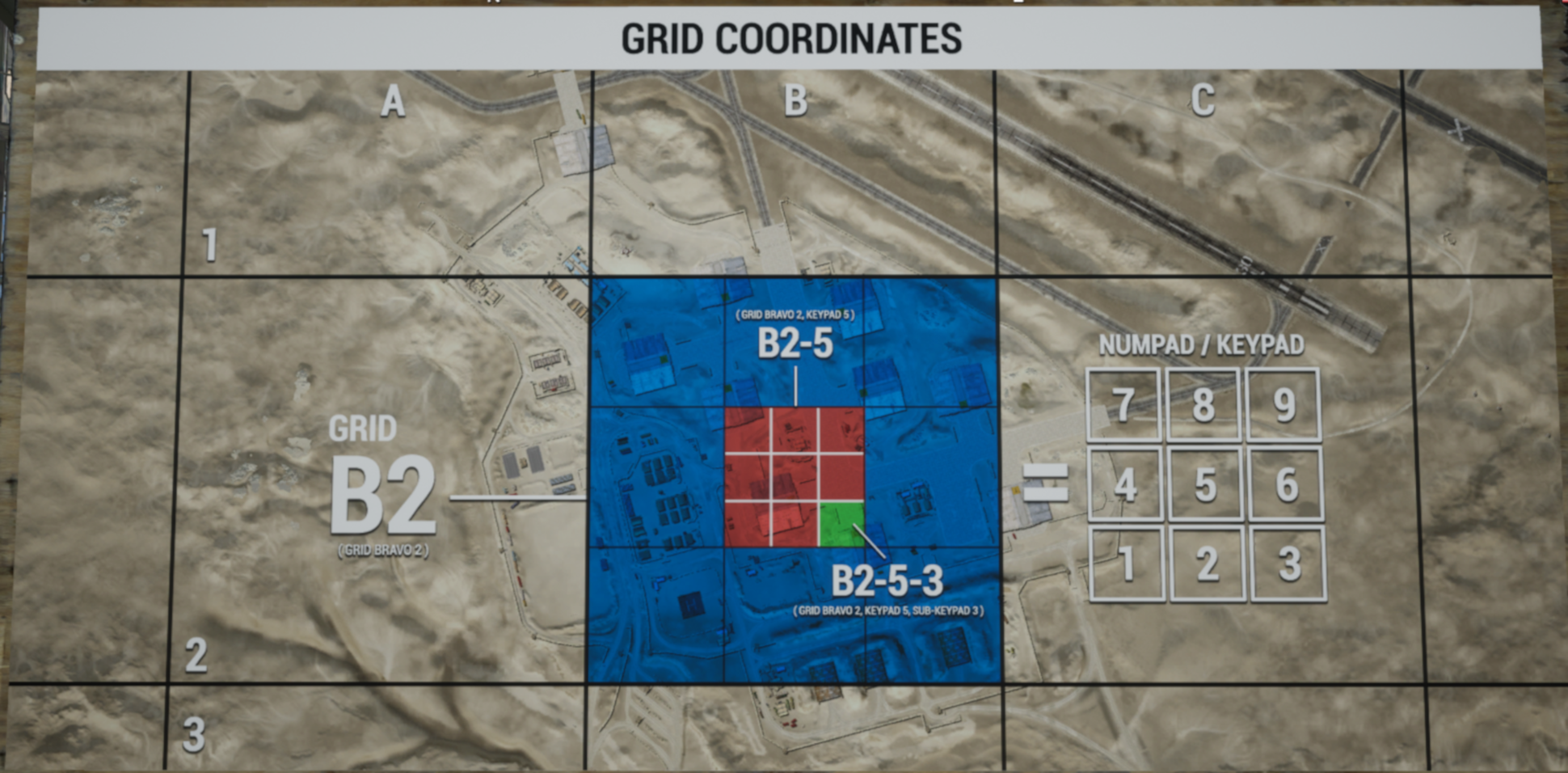
As we can see from the map we have A, B, C across the top of the grid. We then can observer 1, 2, 3 going down the right. Using this we can determine the blue area is "B2".
We can pull even more detail by apply a imaginary numpad / keypad over this and we can determine the center in red is "B2-5".
Now even further we can apply a smaller imaginary numpad / keypad on B2-5 and in the bottom right corner in green we could report out "B2-5-3" as the exact coordinates.
However, we should use the phonetic alphabet previously mentioned. That would end with reporting "Bravo 2, 5, 3" this would provide the most clear and precise coordinates as possible over comms.
As we can see from the map we have A, B, C across the top of the grid. We then can observer 1, 2, 3 going down the right. Using this we can determine the blue area is "B2".
We can pull even more detail by apply a imaginary numpad / keypad over this and we can determine the center in red is "B2-5".
Now even further we can apply a smaller imaginary numpad / keypad on B2-5 and in the bottom right corner in green we could report out "B2-5-3" as the exact coordinates.
However, we should use the phonetic alphabet previously mentioned. That would end with reporting "Bravo 2, 5, 3" this would provide the most clear and precise coordinates as possible over comms.
Vehicle Identification
Accurate vehicle reports and making a marker on the map for the team can really help squad leaders and commanders to put defense or offense in the right place at the right time. Below find a chart with the vehicle name, faction, proper map icon, engine placement, and ammo compartment.
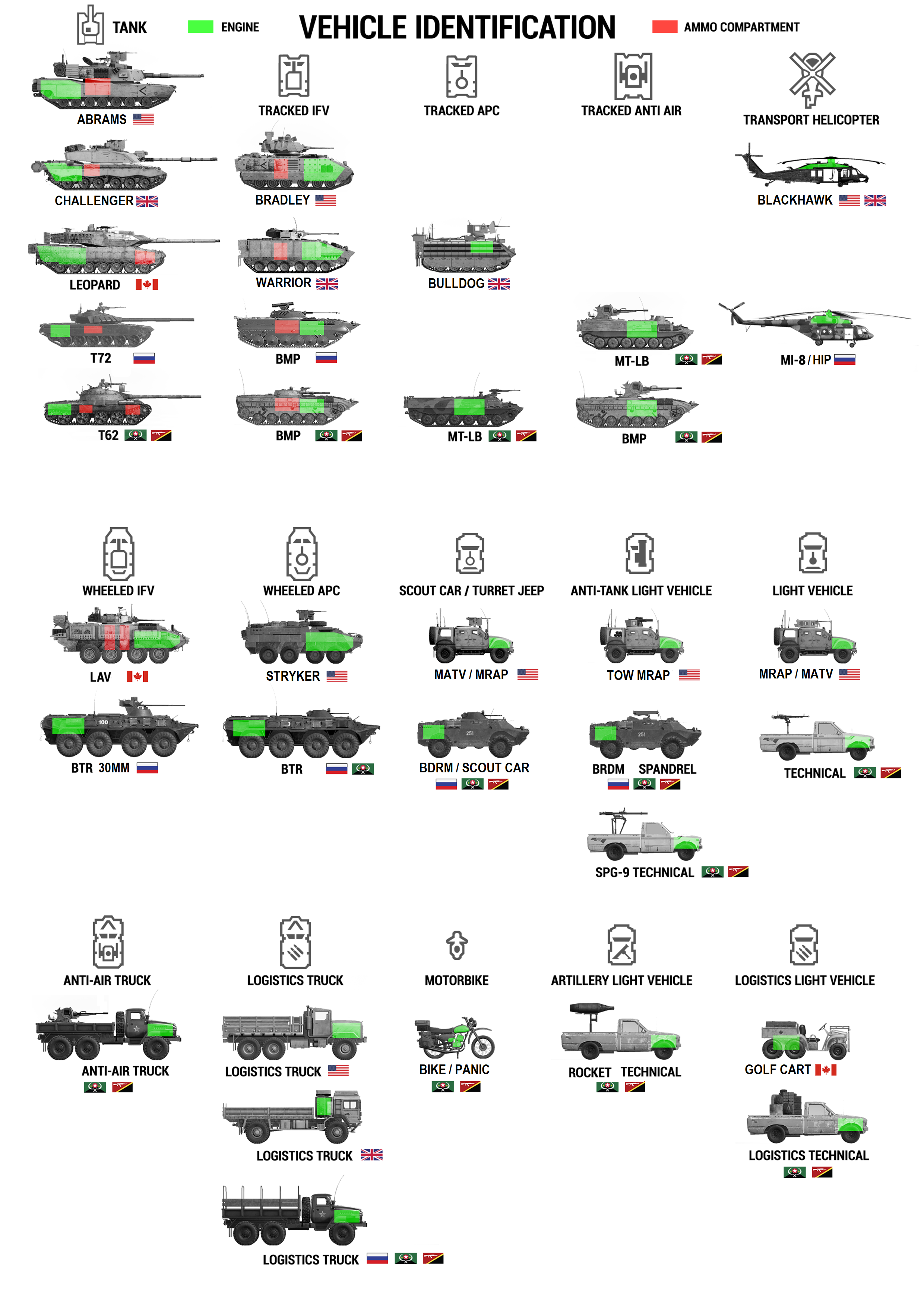
Use this to make reports or marks on the map.
Please note only the squad leaders and fire team leaders can make map markers.
If you are unsure of the vehicle type just state if it is tracked or wheeled.
Use this to make reports or marks on the map.
Please note only the squad leaders and fire team leaders can make map markers.
If you are unsure of the vehicle type just state if it is tracked or wheeled.
Uniform Identification
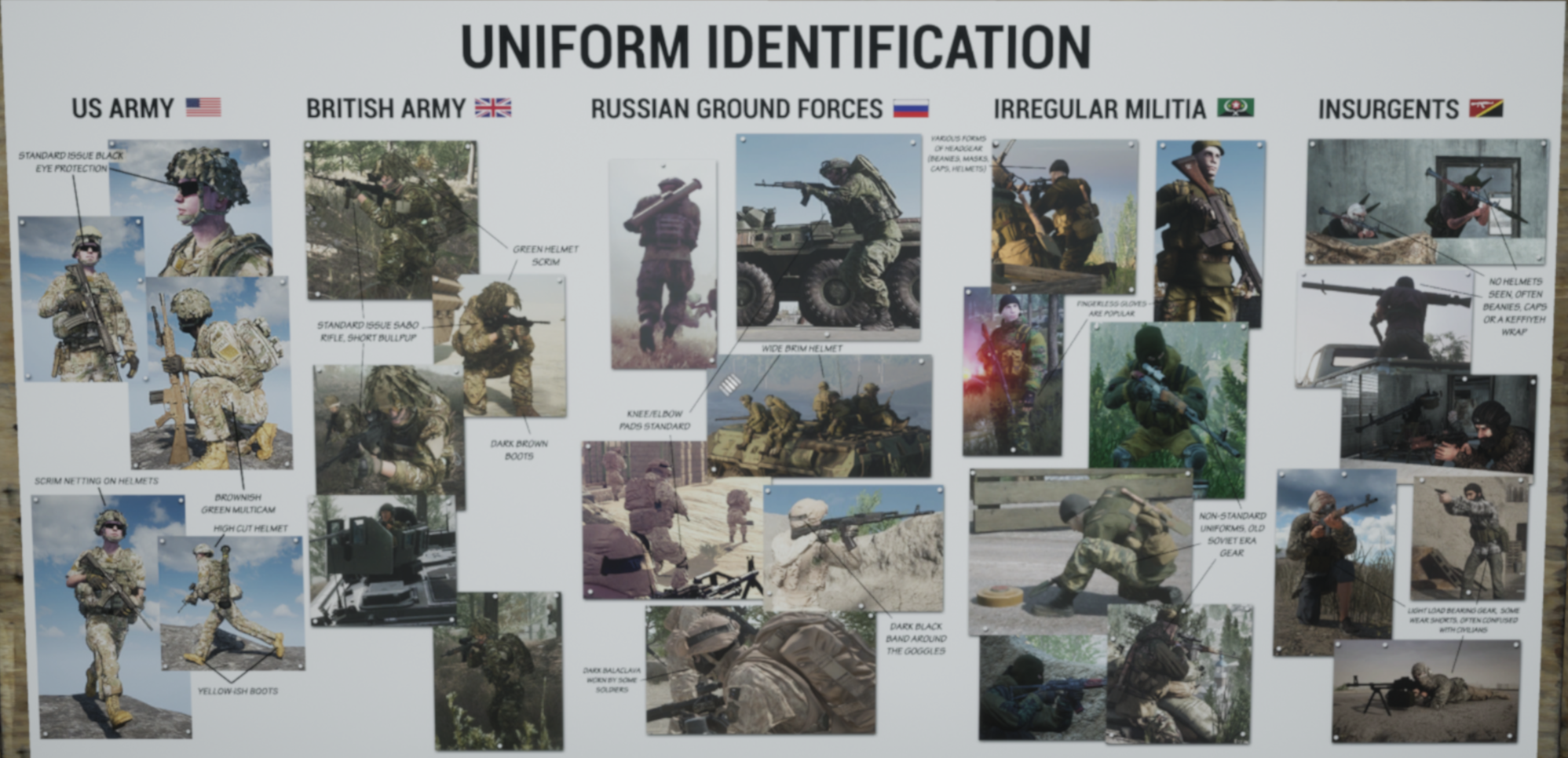
This can be very challenging for new players. Pay close attention to your match up and the team you are on as well as the team you are fighting. Use the below images to help you spot targets vs friendly.
These images are taken from the in game training if you would like to see higher rez images for these please go thought the in game training and take a look there. Steam has a limitation on image size.
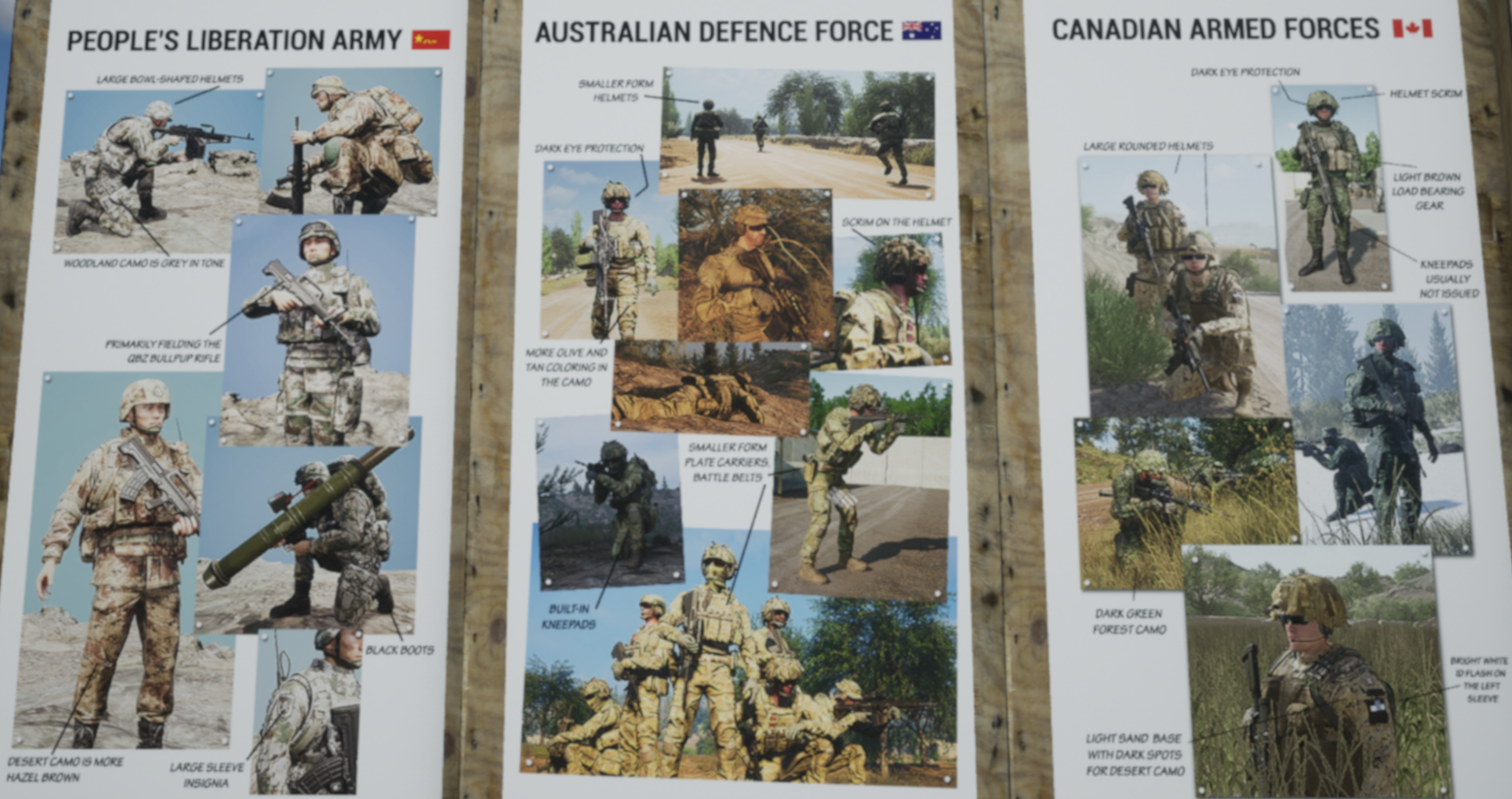
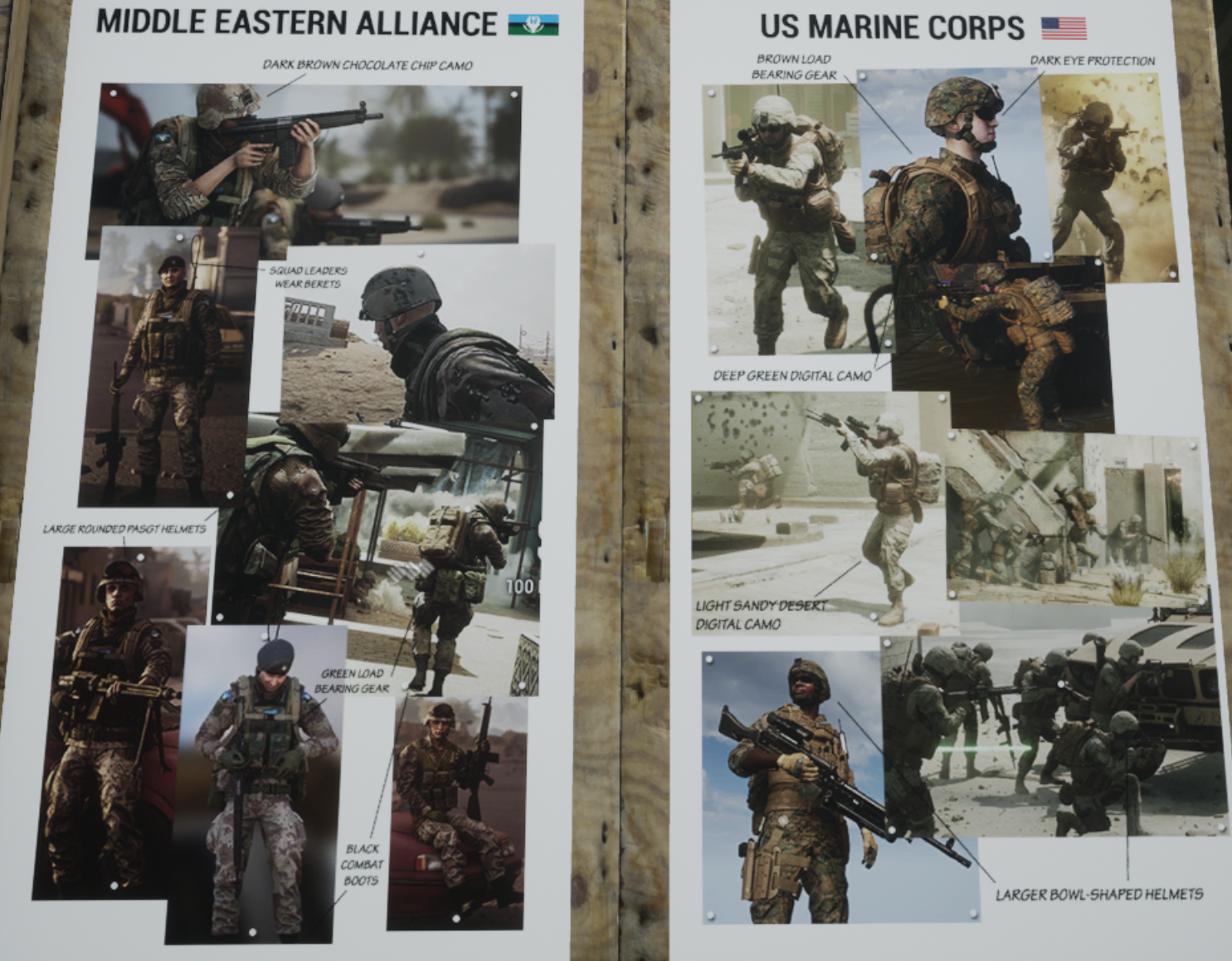
These images are taken from the in game training if you would like to see higher rez images for these please go thought the in game training and take a look there. Steam has a limitation on image size.
Ranging
Figuring how far a target is away is a great way to help relay accurate information. Using the Binoculars is one of the easiest ways to figure this out.
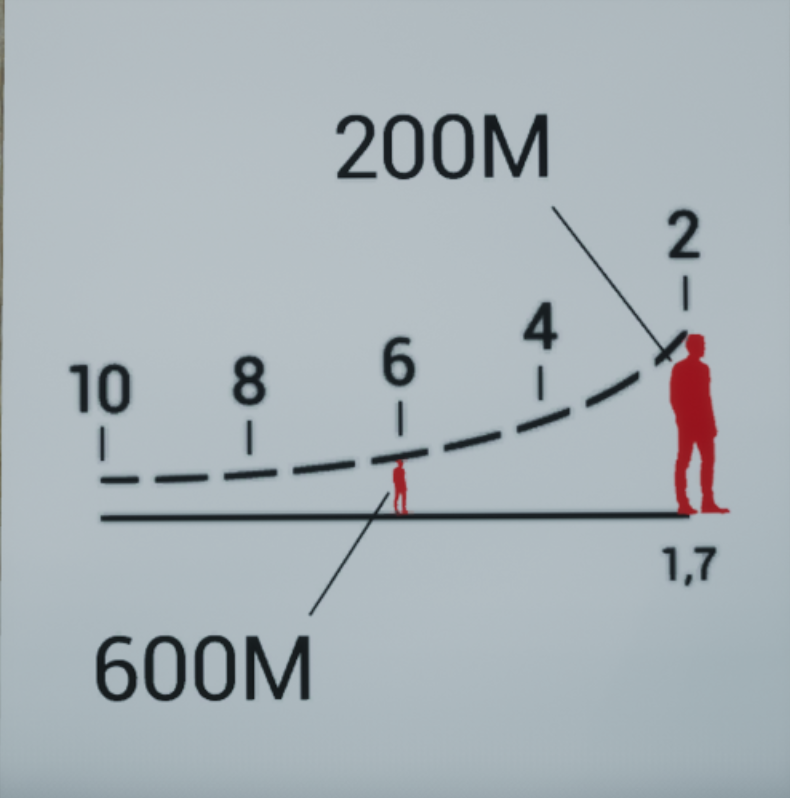
Scale: As we can see from this diagram the scale found at the bottom of your binoculars is for a 1.7 meter tall object (human).
Using this image we can see a human appearing in the scale at 2 is 200 meters away.
The human appearing in the 6 is 600 meters away.
You can apply this logic to other sighting and ranging equipment.
Scale: As we can see from this diagram the scale found at the bottom of your binoculars is for a 1.7 meter tall object (human).
Using this image we can see a human appearing in the scale at 2 is 200 meters away.
The human appearing in the 6 is 600 meters away.
You can apply this logic to other sighting and ranging equipment.
Making Callouts
Making callouts is a great way to inform your squad / command / players around you of what is going on. Using the information found in the previous section you should know where to report what you are seeing correctly. You should also try your best to identify it properly. Again, this is not easy for the new player. Use the images in the Vehicle and Uniform sections to help. You can also turn to google and google the team you are playing to know patterns to look for.
Callouts on foot: If you are on foot try to give "Cardinal" directions. Cardinal directions are given like you are standing in the middle of a compass. Squad gives you a compass to use. Don't give bearings on foot as it is orientated to where you are standing. Just say in "North", "East", or "Southwest". This way the others around you can look in that general direction and not focus on a false bearing.
Callouts in Vehicles: If you are in the same vehicle you can give bearings for more accurate call outs. This is the more appropriate time to give bearings as to where the enemy is for gunners or drivers. Drivers may want to avoid have their more vulnerable side pointed at the target.
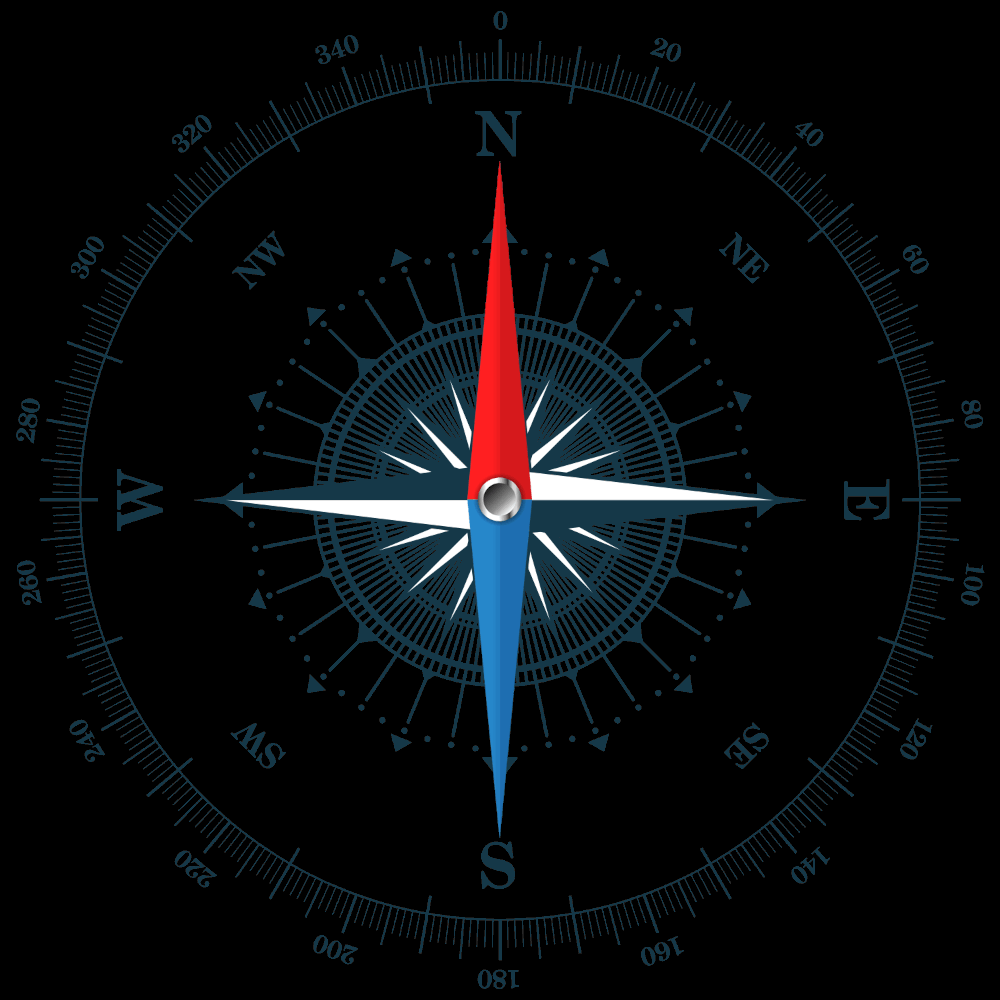
Callouts on foot: If you are on foot try to give "Cardinal" directions. Cardinal directions are given like you are standing in the middle of a compass. Squad gives you a compass to use. Don't give bearings on foot as it is orientated to where you are standing. Just say in "North", "East", or "Southwest". This way the others around you can look in that general direction and not focus on a false bearing.
Callouts in Vehicles: If you are in the same vehicle you can give bearings for more accurate call outs. This is the more appropriate time to give bearings as to where the enemy is for gunners or drivers. Drivers may want to avoid have their more vulnerable side pointed at the target.