

How to enable Achievements with ANY mod
 Democracy's Finest #89432473128
(297 ratings)
Jan 14, 2022 @ 3:29pm24,113642
AchievementsEnglish
Intro
You'll be able to use any mod you want, even those that say they're not Ironman compatible.
This way you can still earn achievements while playing the way you want.
I personally only use purely visual and UI mods, but some of them change the checksum...which is a bit annoying.
I recomend saving it to another folder or just rename the extension to .old (make sure extensions filetypes are visible/enabled in Windows)
Linux:
This way you can still earn achievements while playing the way you want.
I personally only use purely visual and UI mods, but some of them change the checksum...which is a bit annoying.
Backup:
First, go to your Stellaris directory and make a backup of the stellaris executableI recomend saving it to another folder or just rename the extension to .old (make sure extensions filetypes are visible/enabled in Windows)
Programs you'll need:
Windows:Linux:
- Nano (It just works. Gedit and Notepadqq would crash/get unresponsive)
- Okteta[apps.kde.org]
Automated Method
A friend of mine @r0fld4nc3 is working on improving a project that automates the process.
The patcher does the same, finds the hex values and replaces the bytes it in order to enable Achievements with mods.
You can find the Patcher project on the Stellaris Checksum Patcher GitHub[github.com].
If you find that the Patches are failing to apply on a new game version release, please be patient and wait a bit until the updated patterns become available, as that is a manual process that must be updated by the developer or community.
In case you are able to find the byte pattern to patch, feel free to open an Issue and it will get tested and implemented as soon as possible.
Otherwise, check back at a later date.
Any feedback and/or issues are best addressed in the GitHub Issues page.
The patcher does the same, finds the hex values and replaces the bytes it in order to enable Achievements with mods.
You can find the Patcher project on the Stellaris Checksum Patcher GitHub[github.com].
If you find that the Patches are failing to apply on a new game version release, please be patient and wait a bit until the updated patterns become available, as that is a manual process that must be updated by the developer or community.
In case you are able to find the byte pattern to patch, feel free to open an Issue and it will get tested and implemented as soon as possible.
Otherwise, check back at a later date.
Any feedback and/or issues are best addressed in the GitHub Issues page.
Windows (Word Method)
Note: Values possibly deprecated. Check Automated Patcher[github.com] or manual decompilation guide by class101
First make sure Stellaris isn't running
Open HxD then go to File -> Open and choose the Stellaris.exe
CTRL+A (to select everything) and copy everything to a blank Word file.
Make sure you have the text cursor in the beginning of the document.
Then just do CTRL+F (find/search) and go to advanced find
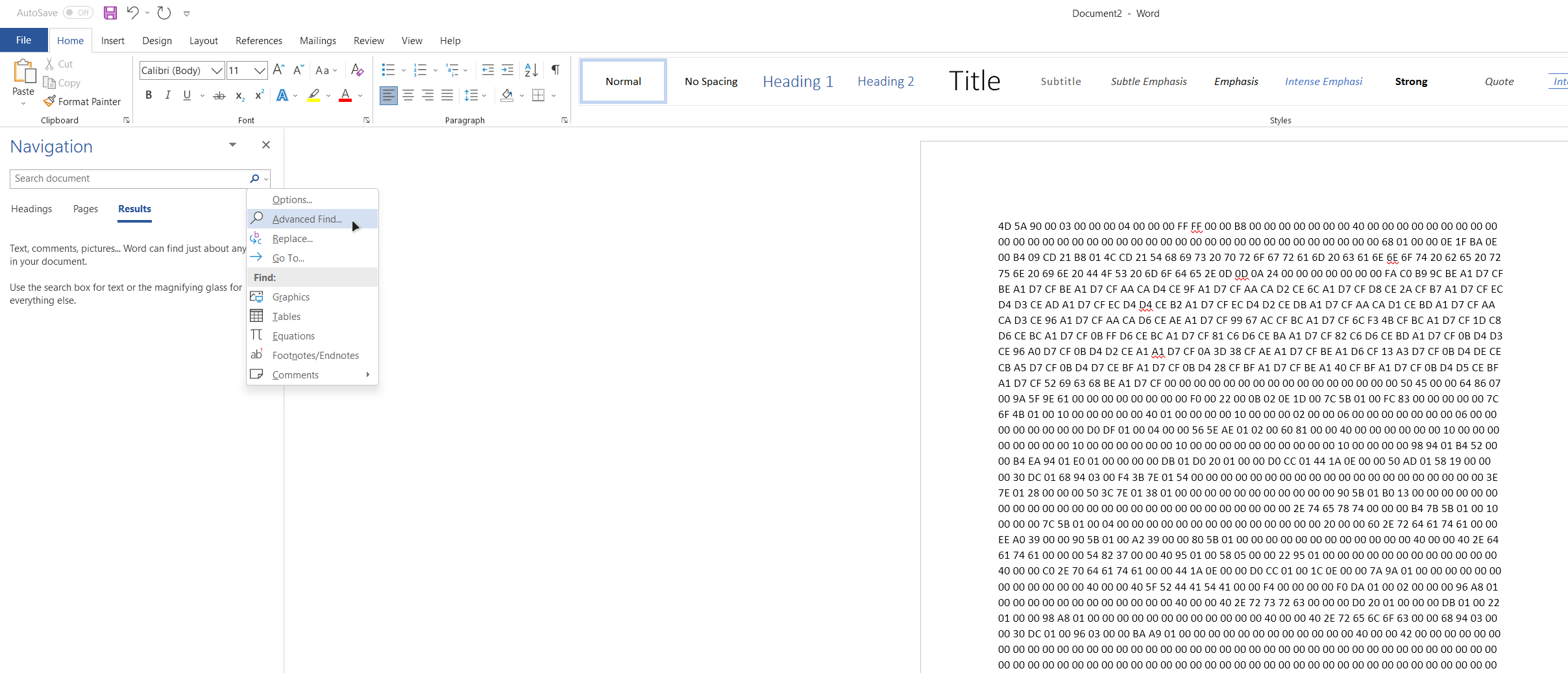
Enable "Use wildcards"
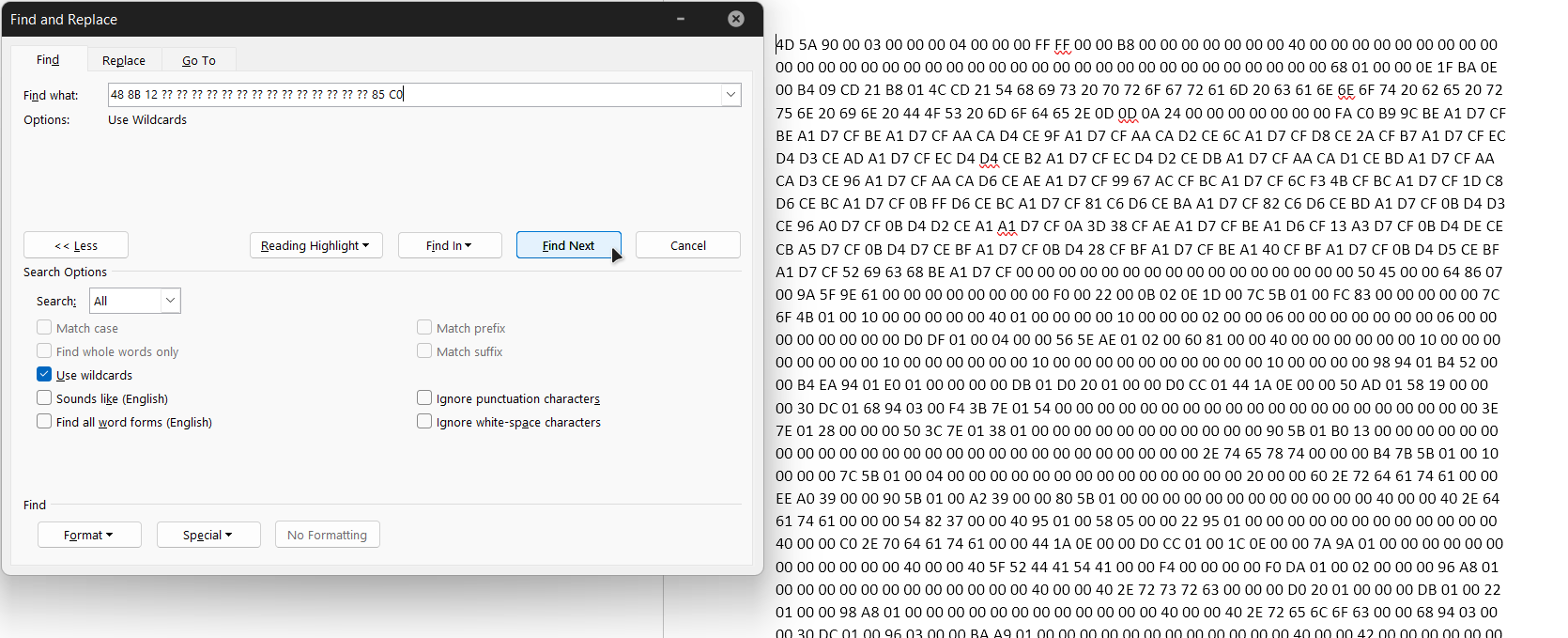
In the search you can use this:
48 8B 12 ?? ?? ?? ?? ?? ?? ?? ?? ?? ?? ?? ?? ?? ?? 85 C0
When you find it on word, copy that value
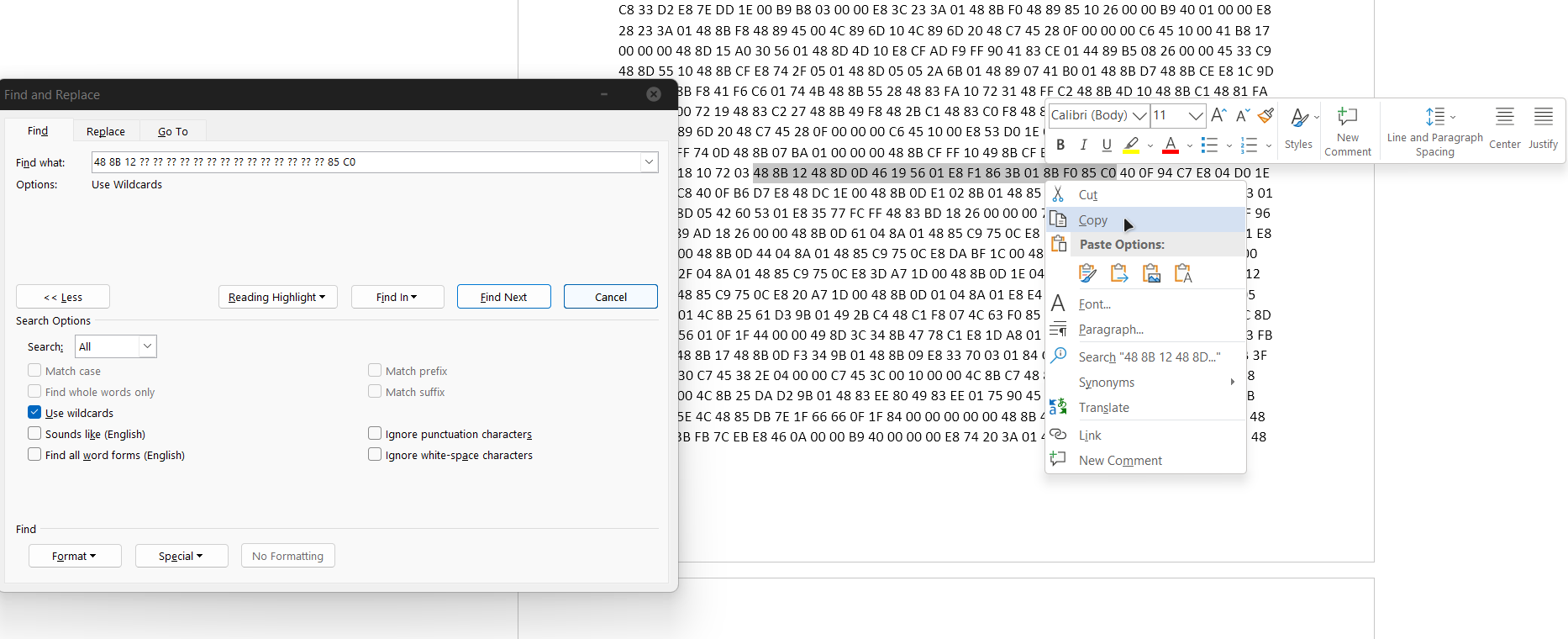
Go back to HxD (with the opened Stellaris.exe)
Search->Find->Hex-values-> Paste the value you just copied from Word and then click "Search All"
After you find the value, change the 85 C0 to 33 C0. Save it and replace the original executable.
Windows (Notepad++ Method)
Note: Values possibly deprecated. Check Automated Patcher[github.com] or manual decompilation guide by class101
Make sure Stellaris isn't running
Open HxD then go to File -> Open and choose the Stellaris.exe
CTRL+A (to select everything) and copy everything to a blank Notepad++ file.
Make sure you have the text cursor in the beginning of the document.
Then just do CTRL+F (search->find) and tick at the bottom "Regular Expression"
In the search you can use this and then "Find Next":
48 8B 12 .. .. .. .. .. .. .. .. .. .. .. .. .. .. 85 C0
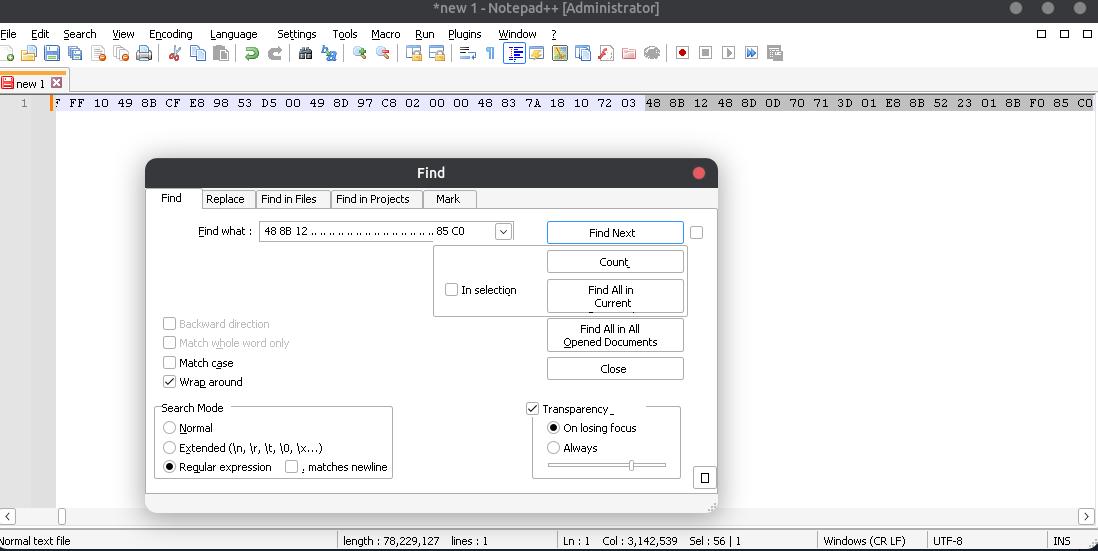
When you find the value, copy it
Go back to HxD (with the opened Stellaris.exe)
Search->Find->Hex-values-> Paste the value you just copied from Word and then click "Search All"
After you find the value, change the 85 C0 to 33 C0. Save it and replace the original executable.
Linux (Native version)
Note: Values possibly deprecated. Check Automated Patcher[github.com] or manual decompilation guide by class101
First make sure Stellaris isn't running
Open Okteta, click "Open" and choose the stellaris executable.
CTRL+A (to select everything), RIGHT-CLICK and select "Copy As"->"Values". In the "Separation" box, remove any space there and then "Copy to Clipboard"
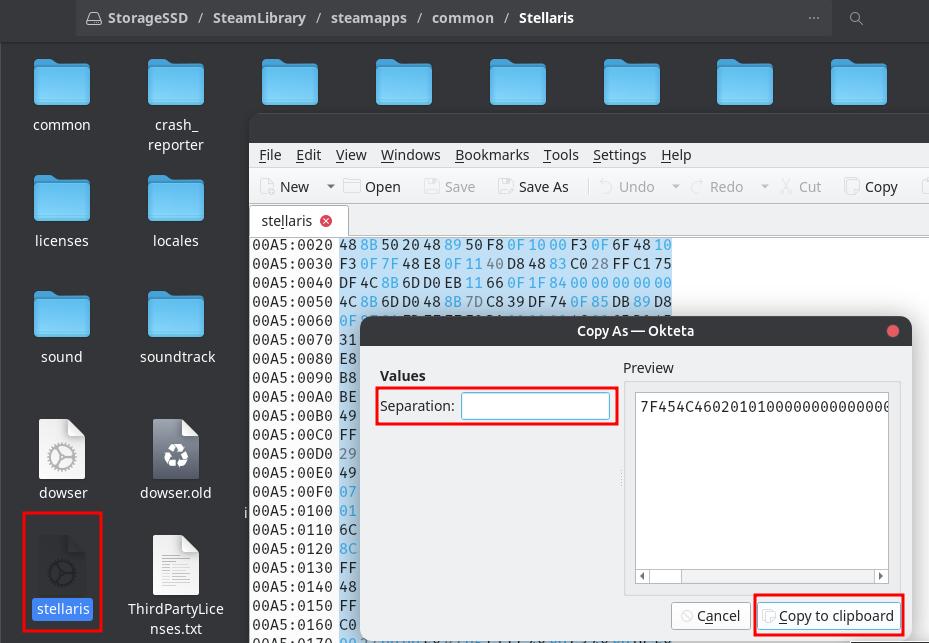
Open your Terminal and enter:
nano hex.txt
Paste your previously copied values to it (CTRL+SHIFT+V)
It will take some time, just wait around 30 secs max
After the values show up, do CTRL+W (Where Is) and ALT+R (Reg.exp.)
Paste the following and enter:
488B30......................................85DB
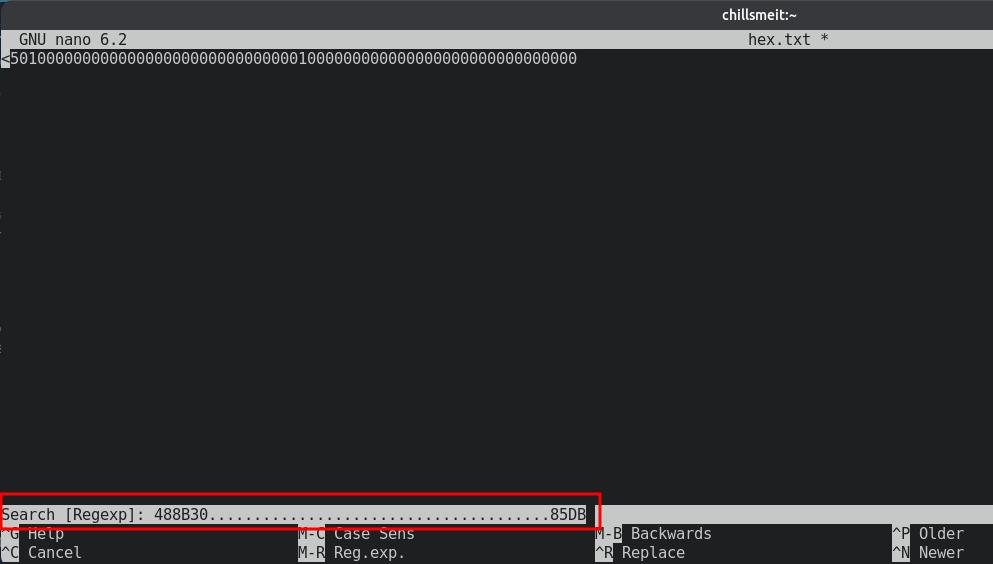
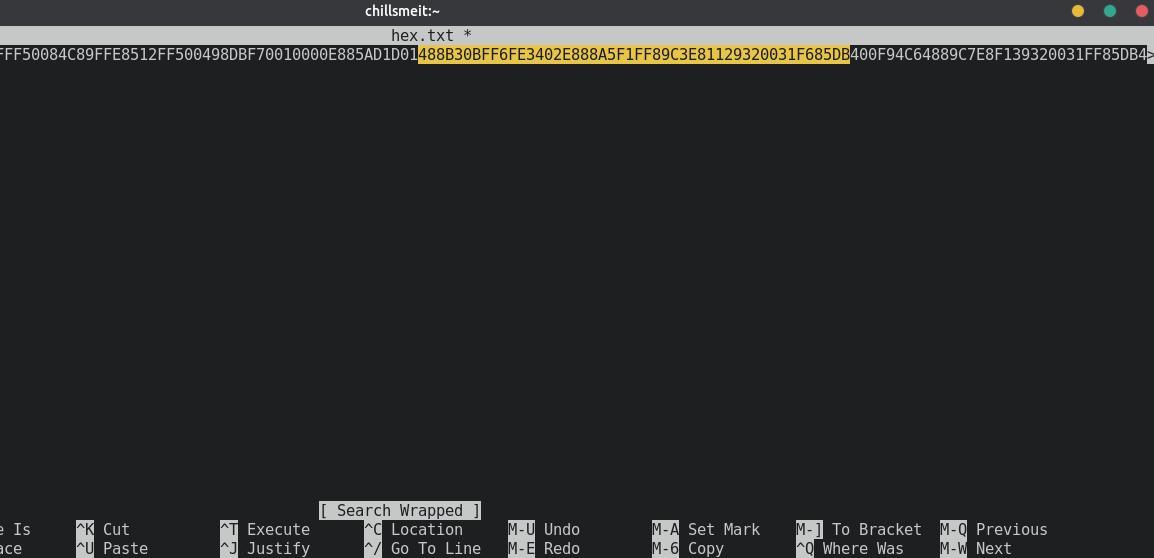
The value will be highlighted for a few seconds. Copy it.
Go back to Okteta with the stellaris executable opened, CTRL+F and paste the hex value
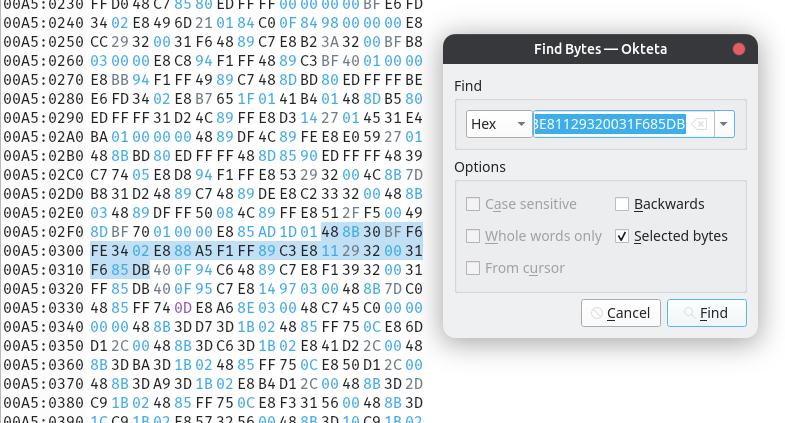
After you find the value, change the 85 DB to 31 DB. Save it and replace the original executable.
Linux (Proton version)
Note: Values possibly deprecated. Check Automated Patcher[github.com] or manual decompilation guide by class101
Since the Proton version is basically the Windows version with a compatibility layer, you can follow the Linux (Native version) steps but use this value instead:
488B12............................85C0
And change the 85 C0 to 33 C0
Explanation & Alternative Methods
If you can't find the value above, you can shorten the amount of ?? or .. you use on your expression
? or . represents one character, any character. So ?? or .. is two characters.
This value can vary depending on your memory allocation, so you can shorten or lengthen the amount of "??" or ".." depending on the program you use
Examples to try (Windows):
48 8B 12 ?? ?? ?? ?? ?? ?? ?? ?? ?? ?? ?? ?? ?? ?? 85 C0
48 8B 12 ?? ?? ?? ?? ?? ?? ?? ?? ?? ?? ?? ?? ?? 85 C0
48 8B 12 ?? ?? ?? ?? ?? ?? ?? ?? ?? ?? ?? ?? 85 C0
Examples to try (Linux):
488B30....................................85DB
488B30..................................85DB
488B30................................85DB
And so on, you get the gist
The Hex value you want to search for always begins with
48 8B 12 and always ends with 85 C0 Windows
48 8B 30 and always ends with 85 DB Linux
It's more time consuming imo and "complicated", especially if you aren't very tech-savvy.
But it's an excelent guide regardless and should be more future proof than what I posted here. (Unless Paradox manages to get some way around it, which I doubt).
? or . represents one character, any character. So ?? or .. is two characters.
This value can vary depending on your memory allocation, so you can shorten or lengthen the amount of "??" or ".." depending on the program you use
Examples to try (Windows):
48 8B 12 ?? ?? ?? ?? ?? ?? ?? ?? ?? ?? ?? ?? ?? ?? 85 C0
48 8B 12 ?? ?? ?? ?? ?? ?? ?? ?? ?? ?? ?? ?? ?? 85 C0
48 8B 12 ?? ?? ?? ?? ?? ?? ?? ?? ?? ?? ?? ?? 85 C0
Examples to try (Linux):
488B30....................................85DB
488B30..................................85DB
488B30................................85DB
And so on, you get the gist
The Hex value you want to search for always begins with
48 8B 12 and always ends with 85 C0 Windows
48 8B 30 and always ends with 85 DB Linux
The more "complicated" alternative:
If this method ever gets outdated (it can happen due to the way it works) or somehow it just doesn't work for you, you can try and use this guide from class101It's more time consuming imo and "complicated", especially if you aren't very tech-savvy.
But it's an excelent guide regardless and should be more future proof than what I posted here. (Unless Paradox manages to get some way around it, which I doubt).
AntiVirus Warnings
The original game executable is probably signed with a Digital Signature. This means that your AntiVirus will try and check this Digital Signature on its database to validate its checksum.
Basically, a checksum is a sequence of numbers and letters used to check data for errors and is calculated by the hex values/bytes. It gives a unique identifier ID to your program let's say.
But since you're altering the executable itself with hex editing, the checksum it'll produce will be different from the original exe, thus creating a false positive for antiviruses when they try to validate it.
Basically, a checksum is a sequence of numbers and letters used to check data for errors and is calculated by the hex values/bytes. It gives a unique identifier ID to your program let's say.
But since you're altering the executable itself with hex editing, the checksum it'll produce will be different from the original exe, thus creating a false positive for antiviruses when they try to validate it.
If you CTD at launch, try adding the modified stellaris executable to the exceptions in your AntiVirus software or the patcher