

How to get working movies on Steam Deck/Linux
 Candyman2000
Feb 11, 2025 @ 7:56pm2572
Modding or ConfigurationEnglish
Explanation:
So anyone playing this game on a steam deck or Linux will eventually find out as they finish act 1 that one of three things will happen
1: The screen will flash and then you'll be presented with a white screen that will make it appear as if the game has crashed
2: The game will play the movie as intended but it will do so without any audio playing
3: Possible depending on your distro it plays without any issue
Assuming you have encountered the same issue i had i'll go through the steps that seem to remedy this issue step by step.
1: The screen will flash and then you'll be presented with a white screen that will make it appear as if the game has crashed
2: The game will play the movie as intended but it will do so without any audio playing
3: Possible depending on your distro it plays without any issue
Assuming you have encountered the same issue i had i'll go through the steps that seem to remedy this issue step by step.
Remedy:
1: Use the discovery store to download protonup-qt
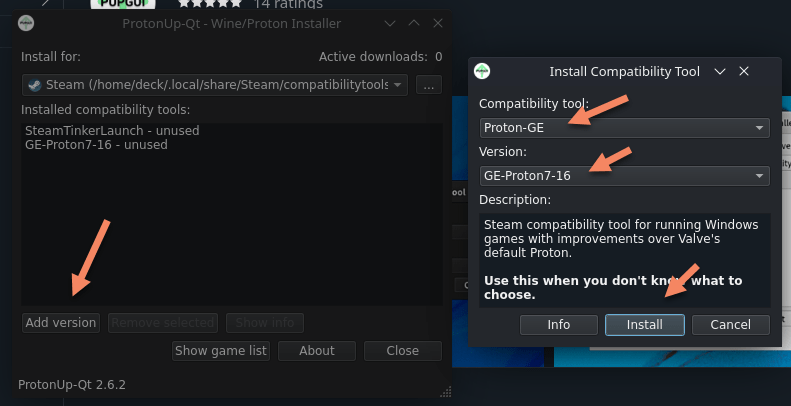
2: Add version ge-proton 8-9, then show game list find the shell part 1, then set the shell to use ge-proton 8-9
 3: Then press apply you'll have to close the steam app before this will be updated to use ge proton 8-9
4: Then go find the folder /home/.steam/steam/compatibilitytools.d/GE-Proton8-9/files/lib64/
5: Find libprotonmediaconverter.so make a copy of it and toss it somewhere like in documents then delete the original
* As far as i'm aware this also works with GE-Proton 8-6 i'm not sure about any other versions
** If you are using Proton GE-Proton 8-9 for any other games deleting the mediaconverter.so might break audio for those game so ideally keep an copy of it somewhere
*** The file may not appear i dunno why it seemingly pops up in some instances and not others but deleting it seems to remedy the audio playback and using proton ge 8-9 or ge 8-6 allows for proper video playback
**** if nothing else works simply right click to skip the cutscene
2: Add version ge-proton 8-9, then show game list find the shell part 1, then set the shell to use ge-proton 8-9
3: Then press apply you'll have to close the steam app before this will be updated to use ge proton 8-9 4: Then go find the folder /home/.steam/steam/compatibilitytools.d/GE-Proton8-9/files/lib64/
5: Find libprotonmediaconverter.so make a copy of it and toss it somewhere like in documents then delete the original
* As far as i'm aware this also works with GE-Proton 8-6 i'm not sure about any other versions
** If you are using Proton GE-Proton 8-9 for any other games deleting the mediaconverter.so might break audio for those game so ideally keep an copy of it somewhere
*** The file may not appear i dunno why it seemingly pops up in some instances and not others but deleting it seems to remedy the audio playback and using proton ge 8-9 or ge 8-6 allows for proper video playback
**** if nothing else works simply right click to skip the cutscene
Shoutout:
 Shoutout to Asnanon from protondb with the fix to get audio working during movies.