

CS2怎么在全屏模式下使用 | How to use it in CS2 with full-screen
 Fragger
Nov 8, 2023 @ 8:23am8673
Modding or ConfigurationSimplified ChineseTraditional ChineseEnglish
全屏优化 | full-screen optimizations
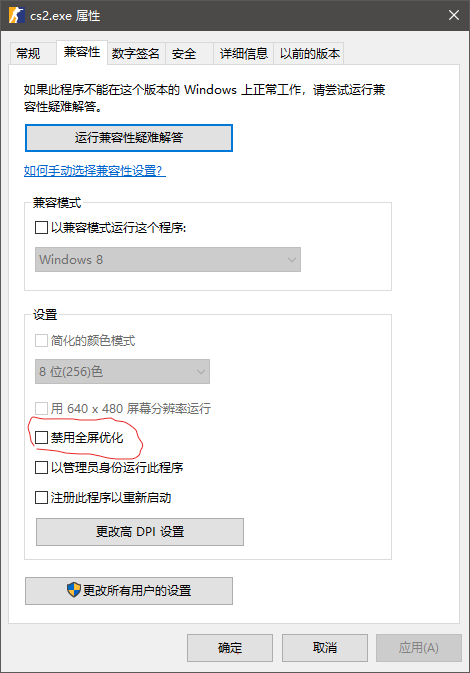
很简单,只需要取消勾选CS2程序的属性卡中,兼容性选项下的“禁用全屏优化”就可以了,如图,但是这样做有可能会让CS2变得卡顿,你可以在CS2安装路径中找到CS2主程序,路径是:\SteamLibrary\steamapps\common\Counter-Strike Global Offensive\game\bin\win64
在这个路径中你就能看到CS2.exe这个文件
It's quite straightforward. Simply uncheck "Disable fullscreen optimizations" under the Compatibility tab in the properties of the CS2 program, as shown in the image. However, doing so may lead to potential lags or slowdowns within CS2
You can locate the main CS2 program within the CS2 installation path: \SteamLibrary\steamapps\common\Counter-Strike Global Offensive\game\bin\win64. In this directory, you will find the CS2.exe file.
在这个路径中你就能看到CS2.exe这个文件
It's quite straightforward. Simply uncheck "Disable fullscreen optimizations" under the Compatibility tab in the properties of the CS2 program, as shown in the image. However, doing so may lead to potential lags or slowdowns within CS2
You can locate the main CS2 program within the CS2 installation path: \SteamLibrary\steamapps\common\Counter-Strike Global Offensive\game\bin\win64. In this directory, you will find the CS2.exe file.