

Arc Raiders: Item Database Loot Guide to Keep / Sell / Recycle (RaiderStash)
 LeRoyalCheese
(82 ratings)
Jan 21 @ 8:08am5,278134
CraftingGameplay BasicsLootMultiplayerWalkthroughsWeaponsEnglish
RaiderStash: Your Complete Guide to Managing Loot in Arc Raiders
Visit RaiderStash: https://raiderstash.online
What is RaiderStash?
Hey Raiders! Tired of staring at your stash wondering "should I sell this Humidifier or keep it?" RaiderStash is here to help! It's a free web app that covers all 225+ items in Arc Raiders and tells you exactly what to do with each one.
The best part? You don't need to install anything. Just open raiderstash.online[raiderstash.online] on your phone or computer, search for any item, and instantly see whether you should SELL it for credits, RECYCLE it for materials, or KEEP it for important projects. Think of it as your personal loot advisor that's always in your pocket.
Whether you're sorting through loot between raids or planning your next crafting session, RaiderStash has your back. It tracks expedition progress, helps you build loadouts, and even works offline once you've loaded it. Let's dive into how to use it!

The best part? You don't need to install anything. Just open raiderstash.online[raiderstash.online] on your phone or computer, search for any item, and instantly see whether you should SELL it for credits, RECYCLE it for materials, or KEEP it for important projects. Think of it as your personal loot advisor that's always in your pocket.
Whether you're sorting through loot between raids or planning your next crafting session, RaiderStash has your back. It tracks expedition progress, helps you build loadouts, and even works offline once you've loaded it. Let's dive into how to use it!
Understanding the Color-Coded Categories
RaiderStash uses a simple color system to tell you what to do with each item at a glance. Every item has a colored badge that shows its recommended action:
The system is smart, too. If you mark an Expedition Project as complete in the tracker, items that were KEEP will automatically change to RECYCLE if you don't need them anymore. No more holding onto items you've already used!

- KEEP (Yellow/Gold) - These items are important! You'll need them for Expedition Projects, Workshop upgrades, or crafting weapons and augments. Don't sell these unless you have extras.
- RECYCLE (Green) - Break these down back at your Speranza's hideout. They turn into useful materials you'll need later, like Assorted Seeds or Simple Gun Parts. For example, all those fruits and mushrooms you find? Recycle them into Assorted Seeds!
- SELL (Cyan) - Convert these to credits. These items don't have any crafting or project uses, so they're just taking up space. The value is shown so you know what you're getting.
- LOADOUT (Orange) - These are craftable items you can equip for raids: weapons, augments, ammo, and gear. Switch to the Loadout tab to see these and plan your build.
The system is smart, too. If you mark an Expedition Project as complete in the tracker, items that were KEEP will automatically change to RECYCLE if you don't need them anymore. No more holding onto items you've already used!
Searching and Filtering Items
Finding items in RaiderStash is super easy. The search bar is right at the top (or below the filters on mobile). Just start typing an item name - "rusty", "seed", "ammo" - and the results appear instantly. All 225+ items are loaded right in your browser for quick access.
Want to see only certain types of items? Use the category filters:
You can also filter by rarity (Common, Uncommon, Rare, Epic, Legendary) and sort items alphabetically, by category, by rarity, or by value. This is perfect when you're looking through your stash and want to quickly check all your Rare items or see what's worth the most credits.
Pro tip: If you're in your hideout sorting loot, keep RaiderStash open on your phone or second screed. Search each item as you go and make decisions in real-time!

Want to see only certain types of items? Use the category filters:
- Click ALL to see everything
- Click SELL to see only items you should sell
- Click RECYCLE to see only items worth recycling
- Click KEEP to see only important items
You can also filter by rarity (Common, Uncommon, Rare, Epic, Legendary) and sort items alphabetically, by category, by rarity, or by value. This is perfect when you're looking through your stash and want to quickly check all your Rare items or see what's worth the most credits.
Pro tip: If you're in your hideout sorting loot, keep RaiderStash open on your phone or second screed. Search each item as you go and make decisions in real-time!
Tracking Your Expedition and Workshop Progress
Click the PROJECTS tab to access the tracker. This feature is made for planning ahead. It shows you every item needed for:
Each project shows you exactly what items you need and how many. Click the checkbox next to a phase or level when you complete it, and RaiderStash remembers your progress. There's even a progress bar at the top showing how much of the game you've completed!
When you complete a project that needed certain items, those items automatically change from KEEP to RECYCLE (if they're not needed elsewhere). So you'll never hold onto items you don't need anymore.
Use the Complete All button if you want to mark an entire expedition done at once, or Reset All if you're starting a new playthrough. Your progress is saved in your browser.

- Expedition Projects - All 4 phases (plus Flickering Flames)
- Workshop Upgrades - Gunsmith, Gear Bench, Medical Lab, and all hideout stations
Each project shows you exactly what items you need and how many. Click the checkbox next to a phase or level when you complete it, and RaiderStash remembers your progress. There's even a progress bar at the top showing how much of the game you've completed!
When you complete a project that needed certain items, those items automatically change from KEEP to RECYCLE (if they're not needed elsewhere). So you'll never hold onto items you don't need anymore.
Use the Complete All button if you want to mark an entire expedition done at once, or Reset All if you're starting a new playthrough. Your progress is saved in your browser.
Building Your Perfect Loadout
Planning a tough raid? Click the LOADOUT tab to access the new loadout crafter. This tool helps you plan your entire build before heading out: weapons, augments, shields, consumables, and backpack.
Here’s how it works:
You’ll see below the complete list of materials required to craft everything in your build. No more crafting one item at a time and realizing you’re short halfway through: you’ll know the full material checklist upfront.
New features:
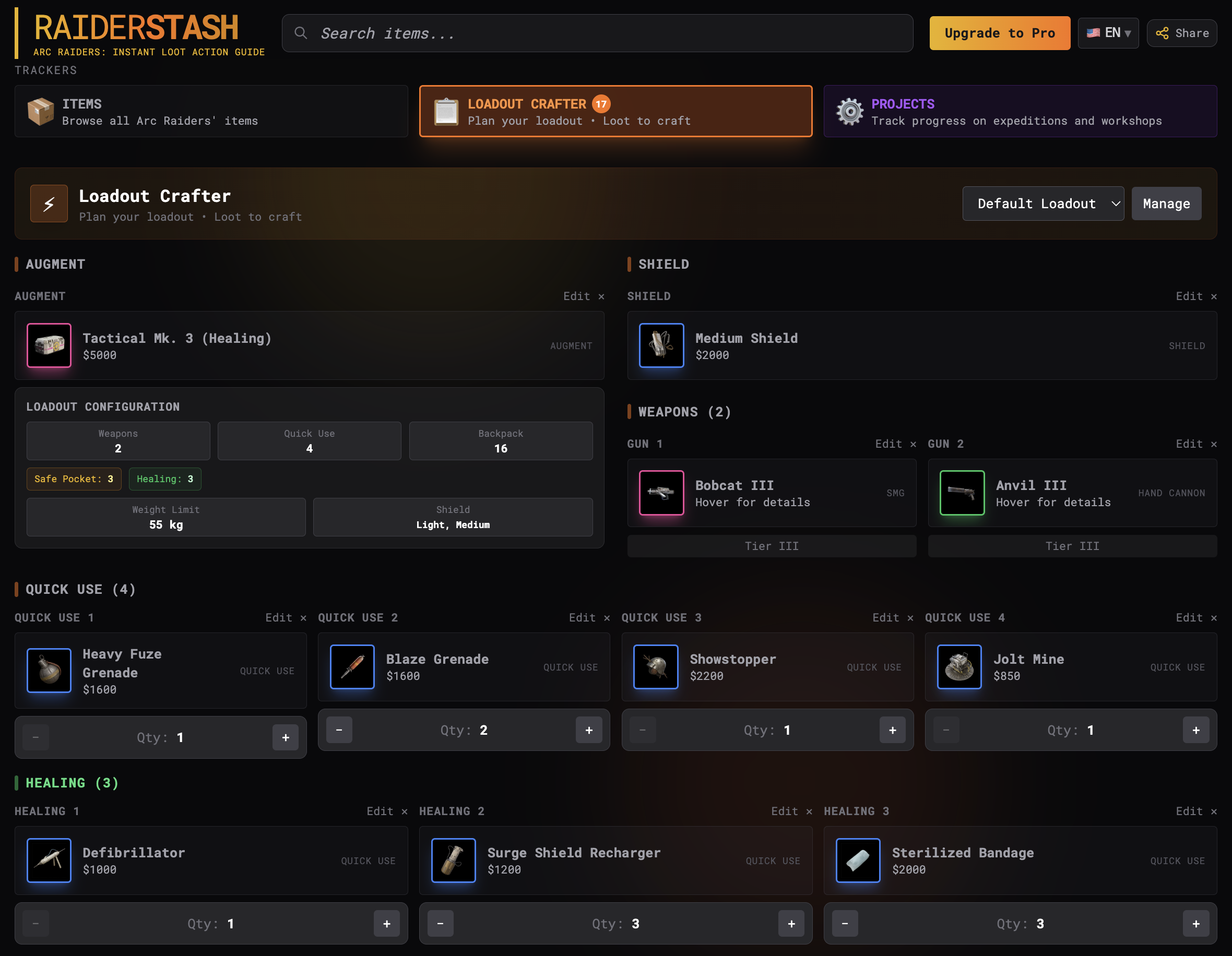

Here’s how it works:
- Browse items in the main view and click the + Loadout button on any craftable item
- For weapons with multiple tiers (I, II, III, IV, V), you’ll pick which tier you want
- The crafter uses a visual slot-based system that mirrors the in-game loadout screen (weapon, augments, shield, quick-use, pockets), so you always know what goes where
- Your selected items appear in your loadout panel
- You can adjust quantities with the +/- buttons or remove items anytime
You’ll see below the complete list of materials required to craft everything in your build. No more crafting one item at a time and realizing you’re short halfway through: you’ll know the full material checklist upfront.
New features:
- Loot recommendations: The crafter shows exactly which items to loot, recycle, or craft to obtain the materials your loadout requires, so you know the most efficient way to loot before you raid
- Preset management: Save and switch between loadouts.
- Smart filters: Filter the Keep tab to display only the materials required for your selected loadout, removing clutter and helping you focus on what matters
- Shareable builds: Use the Share button to generate a link to your exact loadout so your squad can load it instantly and coordinate before heading Topside
Item Details and Smart Tooltips
Want to know more about an item? Just hover your mouse over any item card (or tap it on mobile) and a detailed tooltip appears. This tooltip shows you:
This is useful when you're trying to decide whether to sell or keep something. For example, if you hover over "Battery" you'll see it's needed for multiple Workshop upgrades and is used to craft several augments. That's a definite KEEP!
There's also an + Loadout button right in the tooltip if you want to add the item to your build.

- Rarity and Value - How rare it is and what it sells for
- Needed For - Which Expedition Projects or Workshop upgrades require this item
- Recycles Into - What materials you get if you recycle it
- Used to Craft - Which weapons or augments need this as a material
- Can Be Obtained By Recycling - Alternative ways to get this item
This is useful when you're trying to decide whether to sell or keep something. For example, if you hover over "Battery" you'll see it's needed for multiple Workshop upgrades and is used to craft several augments. That's a definite KEEP!
There's also an + Loadout button right in the tooltip if you want to add the item to your build.
Know How Much to Keep
Ever wondered "how many Mechanical Components should I actually keep?" RaiderStash now shows you exactly how many stacks you need for each material based on your current progress.
How It Works
When you hover over or tap any KEEP item, you'll see:
The "Smart" Part
Here's what makes these recommendations intelligent:
Pro tip: Don't treat these as gospel: they're estimates, not hard rules. Play aggressive and burn ammo like crazy? Keep the max. Prefer a minimal stash? Stick closer to the min.

How It Works
When you hover over or tap any KEEP item, you'll see:
- Recommended stacks (e.g., "3 stacks") — the sweet spot based on all your needs
- Min-max range (e.g., "2-4") — gives you flexibility depending on your playstyle
- Breakdown showing where you'll use them: (Projects, Workshops, Crafting)
The "Smart" Part
Here's what makes these recommendations intelligent:
- They adapt as you progress: Mark a project phase as complete in the Project Tracker, and RaiderStash instantly recalculates. Finished all expedition projects? The recommendation drops to just what you need for crafting.
- They account for recipe usage: An item used in 10 different weapon recipes gets a bigger buffer than something only needed for one project. The system knows which materials are crafting workhorses.
- They're rarity-aware: Legendary materials? Conservative estimates. Common materials? Slightly bigger buffers since you'll burn through them faster.
Pro tip: Don't treat these as gospel: they're estimates, not hard rules. Play aggressive and burn ammo like crazy? Keep the max. Prefer a minimal stash? Stick closer to the min.
Multi-Language Support
RaiderStash speaks your language, too! It's available in:
Click the language selector in the top-right corner to switch. All item names, categories, and interface text change instantly. Your language preference is saved automatically.
- English
- German (Deutsch)
- Spanish (Español)
- French (Français)
- Russian (Русский)
- Portuguese Brazil (Português)
- Polish (Polski)
Click the language selector in the top-right corner to switch. All item names, categories, and interface text change instantly. Your language preference is saved automatically.
Quick Tips for New Raiders
Now that you know how RaiderStash works, here are some pro tips to get the most out of it:
Remember: RaiderStash is community-driven and updated regularly as the game changes. If you notice outdated info or want to suggest features, there's a feedback link in the footer. Happy raiding!
- Keep it open during raids - Have RaiderStash on your phone or second monitor while playing. When you find loot, search it immediately to decide if it's worth your limited stash space.
- Check RECYCLE items regularly - Many "junk" items recycle into important materials. Don't sell apricots and mushrooms, they become Assorted Seeds which you'll need!
- Use the Projects tracker early - Start checking off your progress as you complete Expeditions. This way, RaiderStash will tell you when it's safe to sell or recycle items you've already used.
- Plan loadouts before crafting - Don't waste materials crafting random items. Build your loadout first, see the total material cost, then farm what you need.
- Filter by rarity for value hunting - Sort by rarity or value to quickly see your most valuable items. Epic sellables can be worth serious credits!
- Bookmark it - Add raiderstash.online[raiderstash.online] to your bookmarks or home screen. You'll use it constantly!
Remember: RaiderStash is community-driven and updated regularly as the game changes. If you notice outdated info or want to suggest features, there's a feedback link in the footer. Happy raiding!