

How to Edit Start Biases
 Greypz
Feb 14, 2025 @ 1:58pm47811
Walkthroughs
How to Edit Start Biases
Getting to the Files
In Civilization VII, both civs and leaders have their own start biases. These can be easily found and edited in the games files. We'll start with leaders first. Make sure Civilization VII is not open before you start.
The start biases for leaders can be found in:
C:\Program Files (x86)\Steam\steamapps\common\Sid Meier's Civilization VII\Base\modules\base-standard\data\leaders.xml
Depending on your computer, your Steam folder may not be in C:\Program Files (x86).
In any case, the file is here:
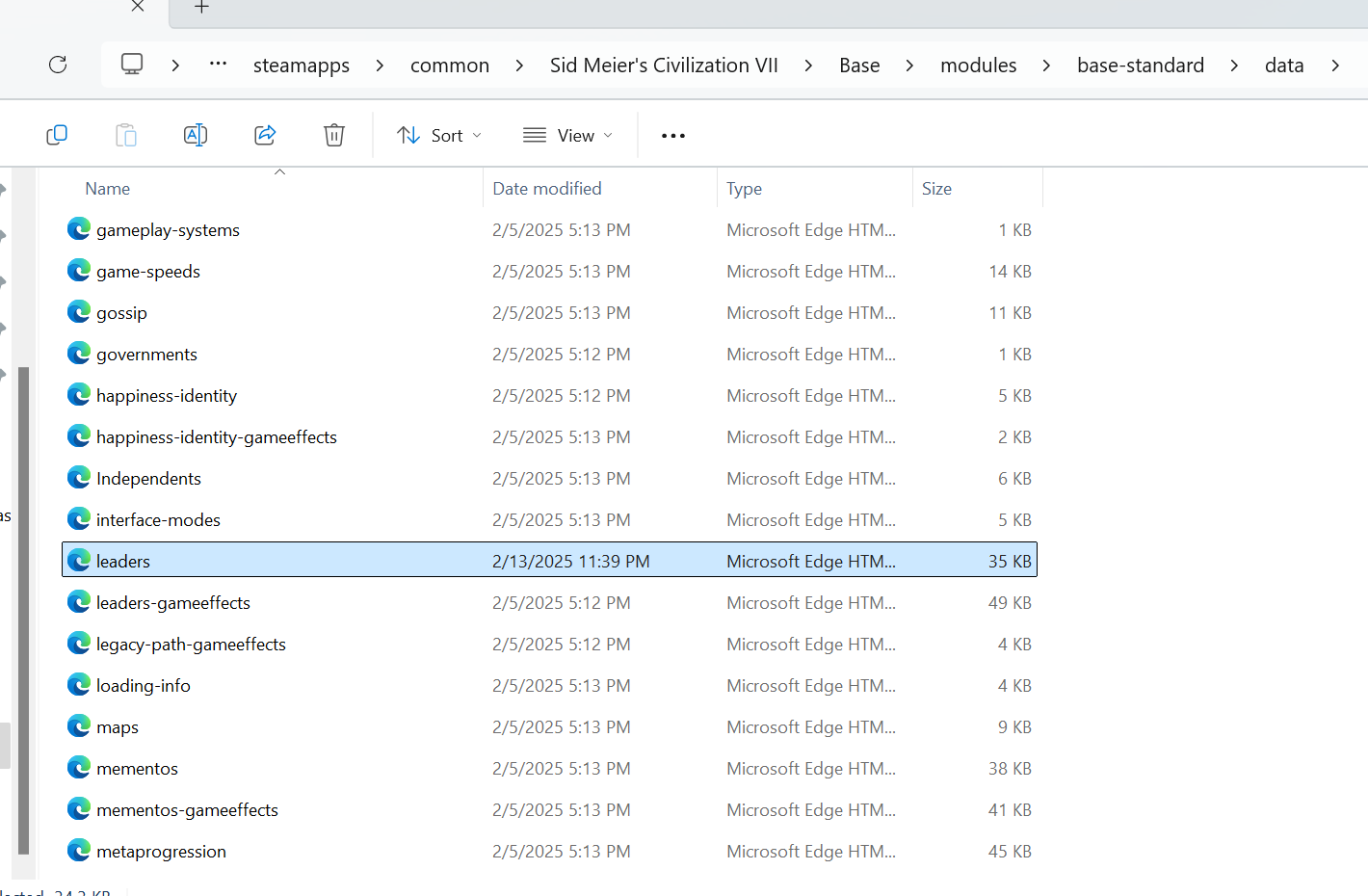
Open it with your preferred editor, if you don't have one, just right-click the file and select edit in Notepad.
Once the file is open, either scroll down to the bottom or just ctrl-F to find "startbias" to find the following lines:
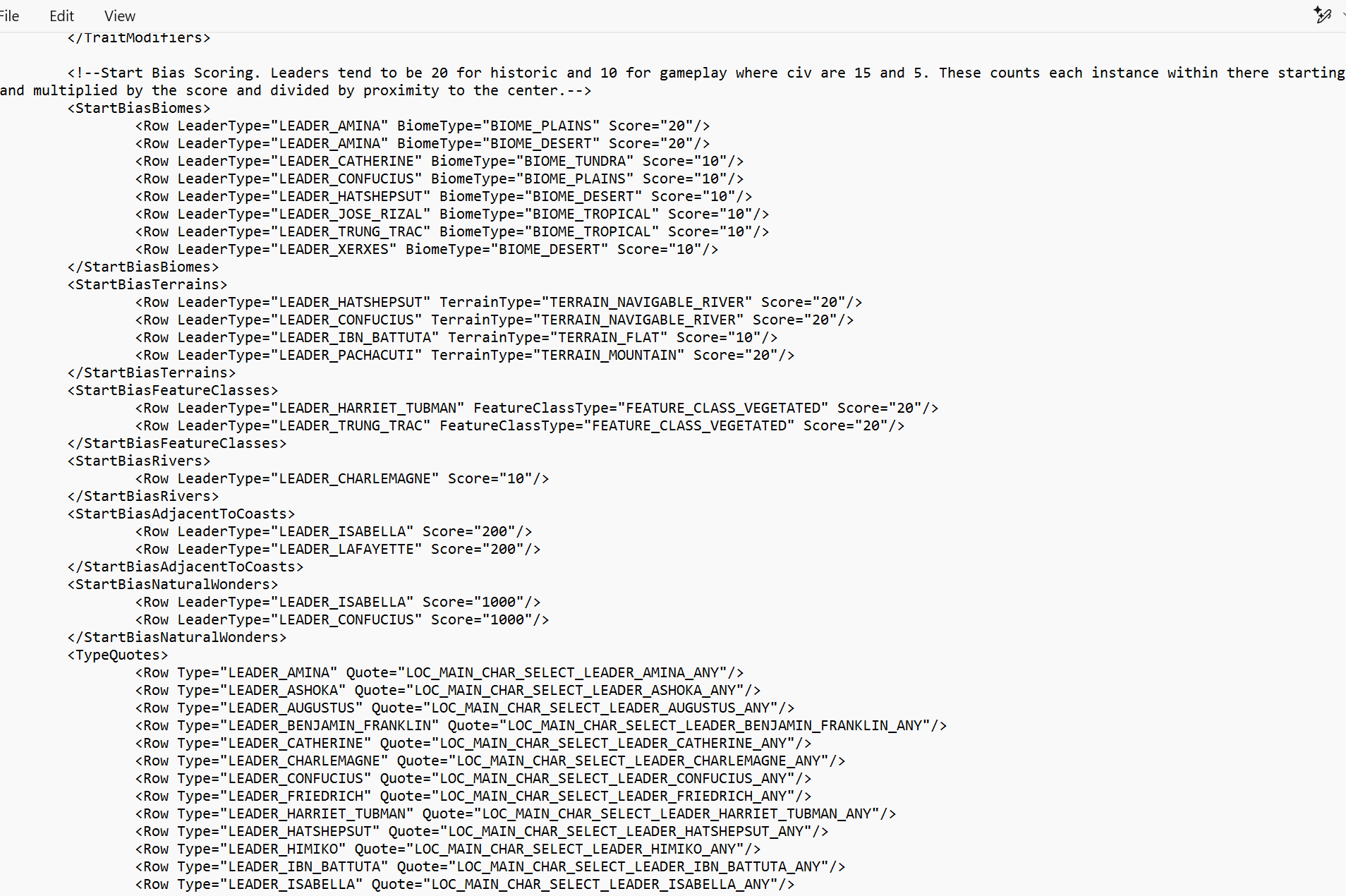
We can see here that the start biases are divided into categories: biomes, terrains, features, rivers, coasts, and natural wonders. Editing from here is pretty easy, mostly just copy and pasting or changing a couple words. Let's go over some examples.
How to Edit
Before we begin, it is always a good idea to make a copy of the file you're about to edit just in case you mess something up. So in this case, copy leaders.xml and paste it to your desktop or something.
Let's try giving Amina a tundra start bias instead of a plains/desert bias. We can find her start bias here:
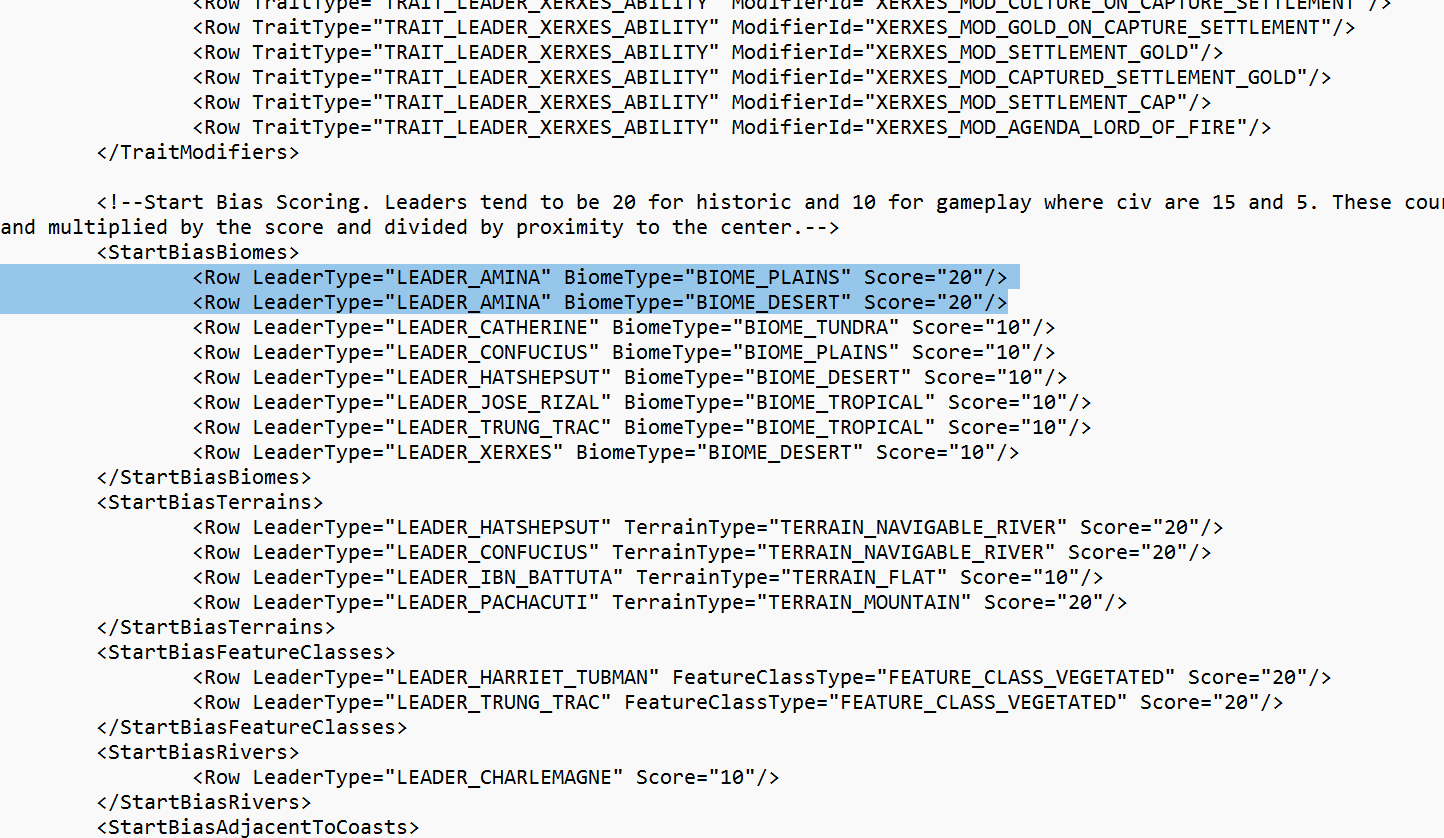
in the format of
<Row LeaderType="LEADER_AMINA" BiomeType="BIOME_PLAINS" Score="20"/>
<Row LeaderType="LEADER_AMINA" BiomeType="BIOME_DESERT" Score="20"/>
where I believe "Score" corresponds to the weight the bias has on map generation.
Looking at the other biases, we can see Catherine has a bias for tundra with a score of 10:
<Row LeaderType="LEADER_CATHERINE" BiomeType="BIOME_TUNDRA" Score="10"/>
It's simple then, that we can give Amina a tundra bias by simply replacing "BIOME_PLAINS" with "BIOME_TUNDRA" in the first row, so that it looks like this:
<Row LeaderType="LEADER_AMINA" BiomeType="BIOME_TUNDRA" Score="20"/>
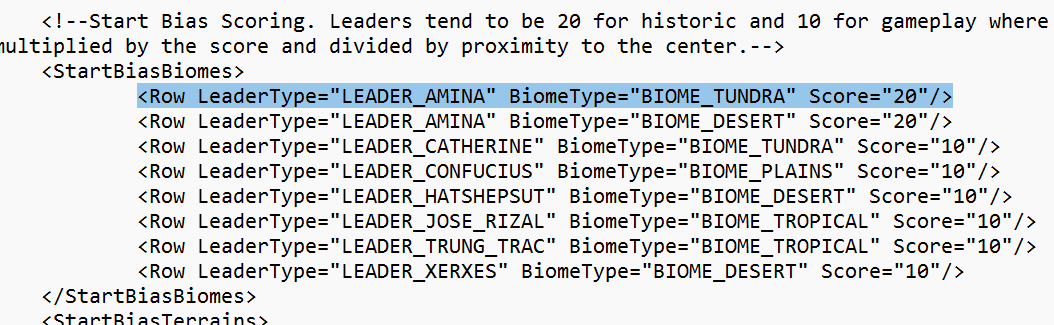
If we wanted to also get rid of Amina's desert start bias entirely, we could also delete that entire row. Like so:
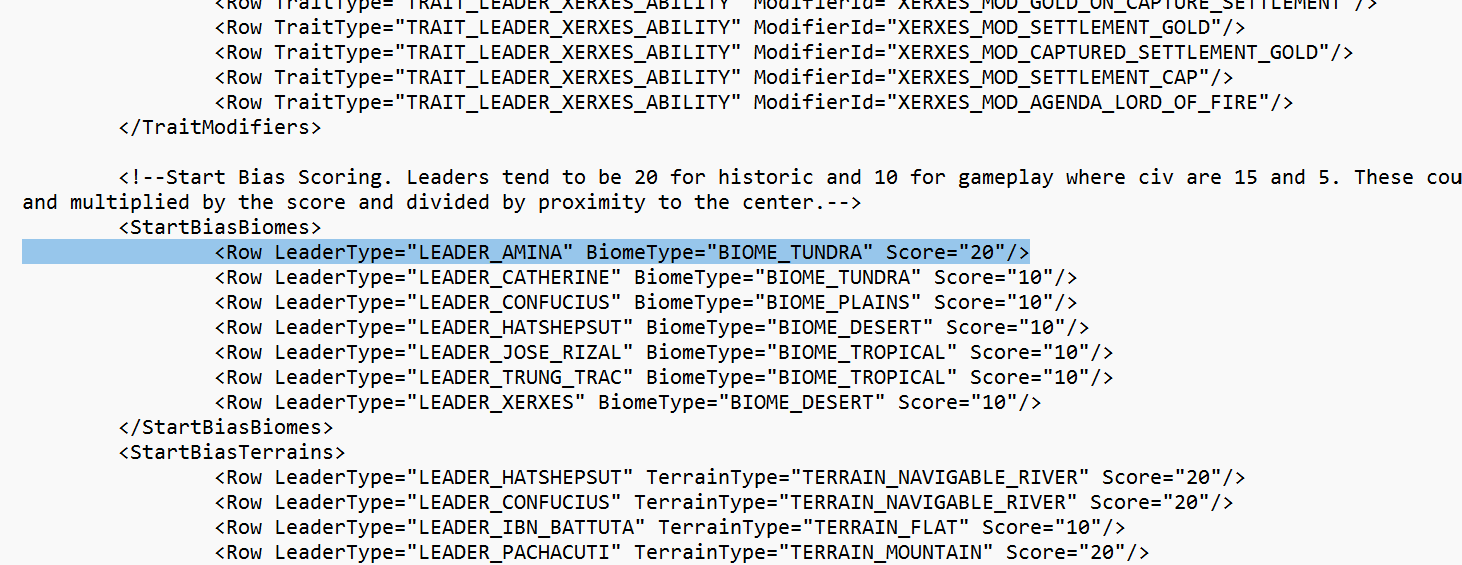
Save your changes, and that's it. Next time you play Civilization VII, Amina will have a tundra start bias.
Other biases
Let's try giving Amina a natural wonder start bias like Isabella. You can find natural wonder biases here:
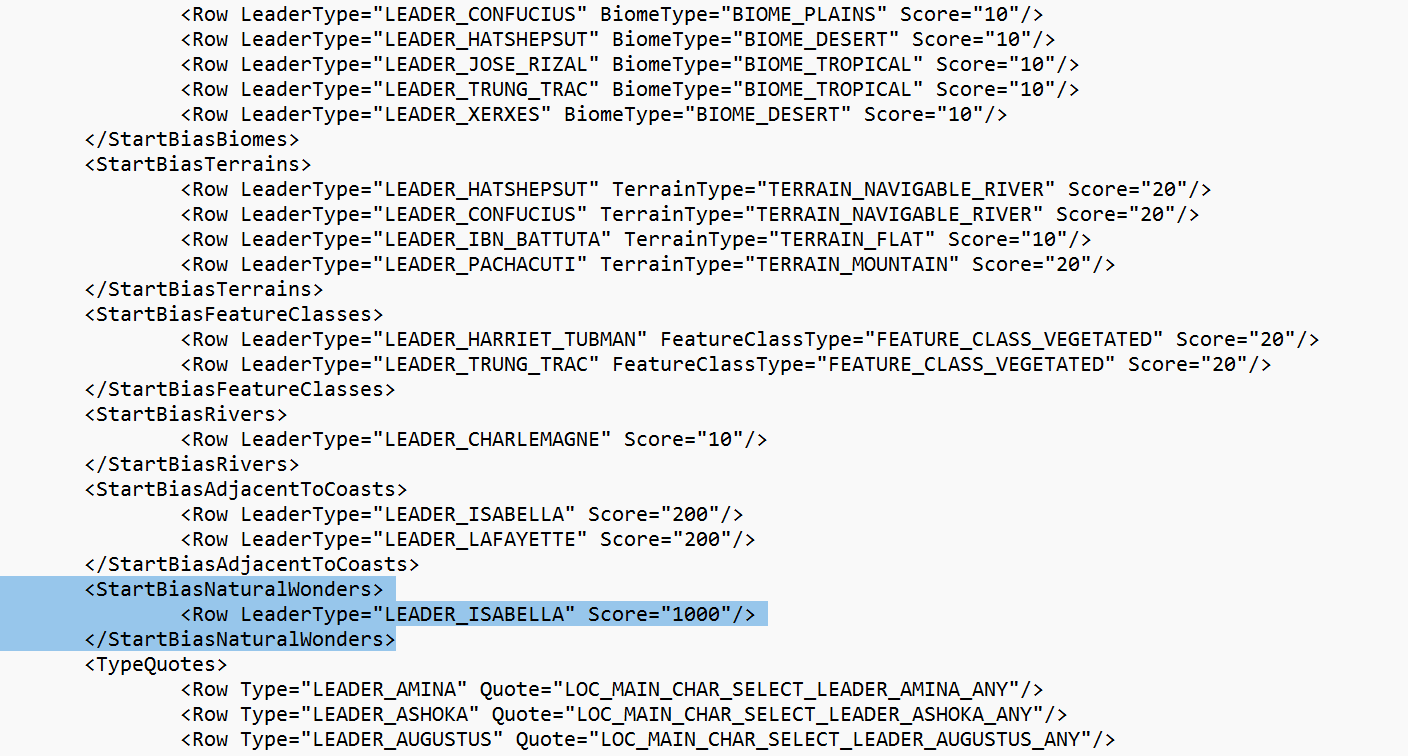
To give Amina a natural wonder bias, we simply have to copy and paste Isabella's bias and replace "LEADER_ISABELLA" with "LEADER_AMINA", like so:
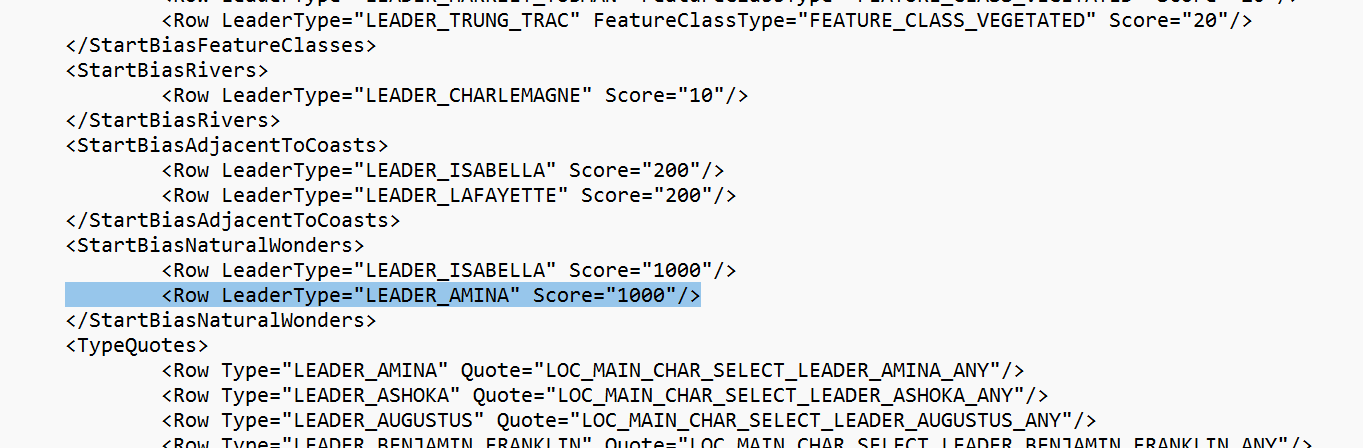
It's just that easy. You can use this copy paste method to also give any leader a navigable river bias, a vegetated bias, etc. in the other categories.
Let's load into a game and see if our changes have taken effect:
 There's some grassland due to Greece's grassland bias, but otherwise, it's working like a charm!
It's pretty much the exact same for editing civilizations: you can find the files for civ start biases in
...\Sid Meier's Civilization VII\Base\modules\age-antiquity\data\civilizations.xml
It is also worth mentioning that since we are editing the game files directly, it is likely that any changes you make will be erased whenever Civilization VII updates, so be aware of that.
Happy editing!
In Civilization VII, both civs and leaders have their own start biases. These can be easily found and edited in the games files. We'll start with leaders first. Make sure Civilization VII is not open before you start.
The start biases for leaders can be found in:
C:\Program Files (x86)\Steam\steamapps\common\Sid Meier's Civilization VII\Base\modules\base-standard\data\leaders.xml
Depending on your computer, your Steam folder may not be in C:\Program Files (x86).
In any case, the file is here:
Open it with your preferred editor, if you don't have one, just right-click the file and select edit in Notepad.
Once the file is open, either scroll down to the bottom or just ctrl-F to find "startbias" to find the following lines:
We can see here that the start biases are divided into categories: biomes, terrains, features, rivers, coasts, and natural wonders. Editing from here is pretty easy, mostly just copy and pasting or changing a couple words. Let's go over some examples.
How to Edit
Before we begin, it is always a good idea to make a copy of the file you're about to edit just in case you mess something up. So in this case, copy leaders.xml and paste it to your desktop or something.
Let's try giving Amina a tundra start bias instead of a plains/desert bias. We can find her start bias here:
in the format of
<Row LeaderType="LEADER_AMINA" BiomeType="BIOME_PLAINS" Score="20"/>
<Row LeaderType="LEADER_AMINA" BiomeType="BIOME_DESERT" Score="20"/>
where I believe "Score" corresponds to the weight the bias has on map generation.
Looking at the other biases, we can see Catherine has a bias for tundra with a score of 10:
<Row LeaderType="LEADER_CATHERINE" BiomeType="BIOME_TUNDRA" Score="10"/>
It's simple then, that we can give Amina a tundra bias by simply replacing "BIOME_PLAINS" with "BIOME_TUNDRA" in the first row, so that it looks like this:
<Row LeaderType="LEADER_AMINA" BiomeType="BIOME_TUNDRA" Score="20"/>
If we wanted to also get rid of Amina's desert start bias entirely, we could also delete that entire row. Like so:
Save your changes, and that's it. Next time you play Civilization VII, Amina will have a tundra start bias.
Other biases
Let's try giving Amina a natural wonder start bias like Isabella. You can find natural wonder biases here:
To give Amina a natural wonder bias, we simply have to copy and paste Isabella's bias and replace "LEADER_ISABELLA" with "LEADER_AMINA", like so:
It's just that easy. You can use this copy paste method to also give any leader a navigable river bias, a vegetated bias, etc. in the other categories.
Let's load into a game and see if our changes have taken effect:
There's some grassland due to Greece's grassland bias, but otherwise, it's working like a charm!It's pretty much the exact same for editing civilizations: you can find the files for civ start biases in
...\Sid Meier's Civilization VII\Base\modules\age-antiquity\data\civilizations.xml
It is also worth mentioning that since we are editing the game files directly, it is likely that any changes you make will be erased whenever Civilization VII updates, so be aware of that.
Happy editing!