How to run the game with an absurd amount of mods
 Crug
Crug(285 ratings)
Nov 10, 2023 @ 7:57pm14,785453
Gameplay BasicsModding or ConfigurationWalkthroughsWorkshopEnglish
The DOs
Here is what you SHOULD do to successfully load your many mods. This is how I get my modlist of nearly 400 mods to work and be stable!

RimSort
If you aren't using RimSort yet there are two possible reasons for that:
1. You haven't heard of it till now
2. You hate yourself
RimSort is an external mod manager for you that can do 2 wonderful things for you:
1. Let you change your mod order and enable/disable mods without launching the game
2. Auto-sort your mods VERY well to prevent conflicts and incompatibility thanks to a community-made auto sorting system
(And more)
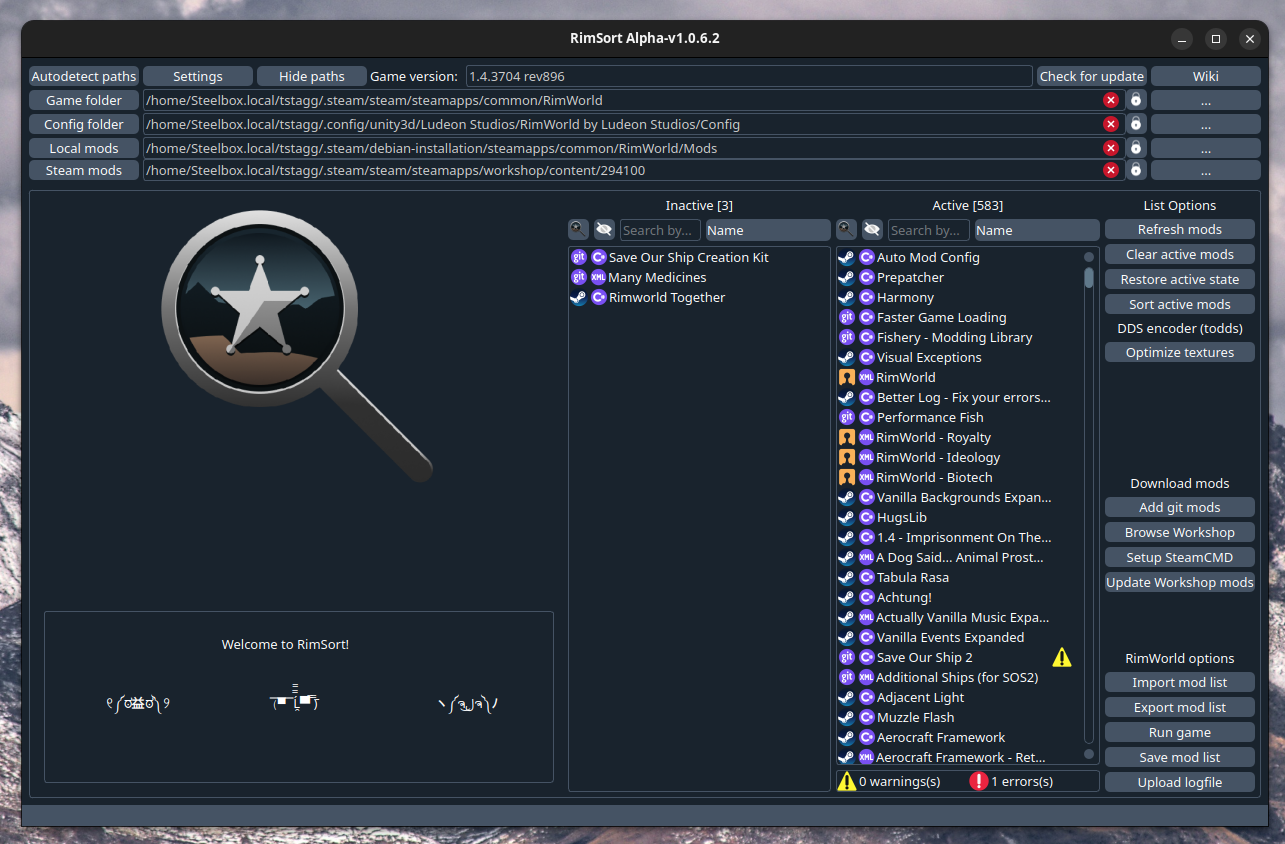 If you are on Windows there is one way to get it:
1. Download it from their Github https://github.com/RimSort/RimSort/releases
If you are on Linux there are two ways to get it:
1. Download it from their Github https://github.com/RimSort/RimSort/releases
2. Download it from the AUR (Arch-based only) https://aur.archlinux.org/packages?O=0&K=rimsort-bin
If you are on a Mac:
1. Check what CPU you have, Intel (i386) or Apple Silicon (arm)
2. Download the appropriate version https://github.com/RimSort/RimSort/releases
The ability to change your mod load order from outside the game saves you some very long load times and can help you recover your game if it won't load. Very nice. The auto sorting function can very often turn a broken load order into a fully functioning load order and save you hours of finagling. Also very nice. RimSort also has various other features that will help you manage and optimize your very very long modlist into something resembling a functioning game!
1. You haven't heard of it till now
2. You hate yourself
RimSort is an external mod manager for you that can do 2 wonderful things for you:
1. Let you change your mod order and enable/disable mods without launching the game
2. Auto-sort your mods VERY well to prevent conflicts and incompatibility thanks to a community-made auto sorting system
(And more)
If you are on Windows there is one way to get it:1. Download it from their Github https://github.com/RimSort/RimSort/releases
If you are on Linux there are two ways to get it:
1. Download it from their Github https://github.com/RimSort/RimSort/releases
2. Download it from the AUR (Arch-based only) https://aur.archlinux.org/packages?O=0&K=rimsort-bin
If you are on a Mac:
1. Check what CPU you have, Intel (i386) or Apple Silicon (arm)
2. Download the appropriate version https://github.com/RimSort/RimSort/releases
The ability to change your mod load order from outside the game saves you some very long load times and can help you recover your game if it won't load. Very nice. The auto sorting function can very often turn a broken load order into a fully functioning load order and save you hours of finagling. Also very nice. RimSort also has various other features that will help you manage and optimize your very very long modlist into something resembling a functioning game!
Cherry picker
Chances are if you have enough mods that some of them overlap. Maybe two mods add something of the same name that work slightly differently. Maybe one of your mods adds something annoying that constantly spawns and makes weird stuff happen in your game. Don't you ever wish you could keep the mod you love but remove the few quirks and annoying features? Well turns out you CAN!
https://steamcommunity.com/sharedfiles/filedetails/?id=2633276599
Cherry Picker lets you remove parts of a mod to get that perfect coherent gameplay you've always wanted!
https://steamcommunity.com/sharedfiles/filedetails/?id=2633276599
Cherry Picker lets you remove parts of a mod to get that perfect coherent gameplay you've always wanted!
Prune your modlist
Does your game look like this?
 Chances are you have a few mods in there you really don't use. I don't dare imply that your 200+ quality of life mods are unnecessary of course. I completely agree that the game is literally unplayable if you're missing even a single one! But do you really need all of those feature mods? Do you actually use what that mod is adding? For example, I had the Rimefeller mod installed for a very long time. Great mod, very cool stuff, only problem is that I literally never used its features. I just thought it was neat. Removing that and other extraneous mods helped me to not only cut down on load times, but also declutter the UI and remove some excess complexity from my already bloated game, and it can help you too! Take the time to go through your modlist and ask yourself if you actually use what that mod is adding.
You can paste your modlist into this website to identify problematic mods that tank performance https://jumli.sysrqmagician.dev/
Chances are you have a few mods in there you really don't use. I don't dare imply that your 200+ quality of life mods are unnecessary of course. I completely agree that the game is literally unplayable if you're missing even a single one! But do you really need all of those feature mods? Do you actually use what that mod is adding? For example, I had the Rimefeller mod installed for a very long time. Great mod, very cool stuff, only problem is that I literally never used its features. I just thought it was neat. Removing that and other extraneous mods helped me to not only cut down on load times, but also declutter the UI and remove some excess complexity from my already bloated game, and it can help you too! Take the time to go through your modlist and ask yourself if you actually use what that mod is adding.You can paste your modlist into this website to identify problematic mods that tank performance https://jumli.sysrqmagician.dev/
Get more RAM and VRAM
During loading, RimWorld puts textures into the VRAM (the RAM in your graphics card used to store textures). If it runs out of VRAM, it moves on to the normal RAM. If you, like me, have nearly 400 mods, then you will need LOTS of VRAM and RAM. My desktop has 16GB of VRAM and 32GB of RAM and is easily able to load my mods. However, my laptop only has 4GB of VRAM and 16GB of RAM, and is not able to load RimWorld because it runs out of RAM and crashes. If you're gonna go insane on mods then you need the hardware to support it, either by buying a graphics card with loads of VRAM (expensive but cool option) or by buying more RAM (way cheaper but not as cool option).
If your game is unable to load due to maxing out your RAM you should try closing any open processes that are using RAM or VRAM before loading the game and just trying to squeeze some more room for your RimWorld. Godspeed.
Note: RimPy has a button to optimize textures that should reduce RAM usage.
If your game is unable to load due to maxing out your RAM you should try closing any open processes that are using RAM or VRAM before loading the game and just trying to squeeze some more room for your RimWorld. Godspeed.
Note: RimPy has a button to optimize textures that should reduce RAM usage.
The DON'Ts
This is what I WOULD do if I wanted my modlist of nearly 400 mods to NOT work and be UNSTABLE!

Subscribe to mods all willy nilly like "ooh this looks neat"
If you are looking at a mod and thinking you might use this one time for one quick playthrough if ever then you really shouldn't subscribe to it. It'll end up getting added to the active modlist by accident and being in the way or it will just sit there forever taking up storage space. Just make a note of it and you can always come back and subscribe to it later.
Use Combat Extended
CE is known to cause conflicts with a lot of mods due to its complete overhaul of the game's combat system, making your efforts to design a functioning modlist much harder.
CE is a great mod absolutely, but ask yourself, is it truly worth breaking so many other mods? For your sanity you should probably avoid CE and instead use lighter substitute mods like:
https://steamcommunity.com/sharedfiles/filedetails/?id=2014429481&searchtext=This%20mod%20does%20not%20require%20the%20start%20of%20a%20new%20game.%20Mod%20Combat%20Update%20is%20compatible%20with%20mods%20for%20new%20weapons.%20Any%20weapon%20will%20receive%20an%20increase%20in%20the%20chance%20of%20hitting%20and%20other%20bonuses%20from%20the%20mod.%20No%20additional%20compatibility%20patches%20are%20required.
No disrespect to the CE devs, it's a great mod.
No disrespect to people who use CE, you are more powerful than me.
UPDATE 2025: I HAVE TAKEN THE CE PILL
CE is a great mod absolutely, but ask yourself, is it truly worth breaking so many other mods? For your sanity you should probably avoid CE and instead use lighter substitute mods like:
https://steamcommunity.com/sharedfiles/filedetails/?id=2014429481&searchtext=This%20mod%20does%20not%20require%20the%20start%20of%20a%20new%20game.%20Mod%20Combat%20Update%20is%20compatible%20with%20mods%20for%20new%20weapons.%20Any%20weapon%20will%20receive%20an%20increase%20in%20the%20chance%20of%20hitting%20and%20other%20bonuses%20from%20the%20mod.%20No%20additional%20compatibility%20patches%20are%20required.
No disrespect to the CE devs, it's a great mod.
No disrespect to people who use CE, you are more powerful than me.
UPDATE 2025: I HAVE TAKEN THE CE PILL
Use outdated mods meant for older versions of the game
Just because they can be activated doesn't mean they should be activated. A lot of the time these mods will still work fine, but also a lot of the time they will cause absurd unforseen issues and generally be a nuisance. If you want to use an outdated mod that bad you should check if someone has given it an unofficial update to the newest version of the game. Chances are Mlie probably has; that distinguished individual is an absolute legend and has updated a TON of old mods to the latest version of the game, so check Mlie first.
Give up
99% of RimWorld modders quit just before they manage to make the modlist work! Keep grinding!

Note from the author
Like, favorite, stuff like that. If you have any wonderful advice of your own to share then please do so in the comments and I will probably add it to the guide. If you find an English error or think I should redo/improve a part of this guide, tell me in the comments and I probably will. If you thought this guide was helpful or had a generally positive outlook on it, tell me in the comments and check out my other guides. If you hated this guide, do not tell me.