

✅ Ugly graphic & bad FPS? 100% FIX + FPS + FG GAINS | Ultimate Performance Guide for Wilds
 Mara Jadewind
(80 ratings)
Jun 13, 2025 @ 6:50am8,396156
Modding or ConfigurationWalkthroughsEnglish
Step by step n00b-term installation guide.
IMPORTANT REMINDER!
-I strongly discourage the use of any modifications or hacks that can alter in-game content or affect the intended gameplay experience with REFramework. This will get your account banned.-Download link is also provided and please do update your Nvidia/AMD driver before begin to avoid any unwanted hassle or error encounter.
-If you had enable READ ONLY on any folder, files or config prior following some guide please disable it.
-AMD GPUs users would not see the same FPS gains as much as Nvidia counterpart but this setup can still significantly reduce stutters and lag thus make MH Wilds to run smoother and have more playable experience in overall.
-AMD GPU users just install REFramework, replace FSR files with the latest version, close your DLSS Swapper, go to step 7-8 and enjoy your MH Wilds.
DOWNLOAD: REFRAMEWORK
https://www.nexusmods.com/monsterhunterwilds/mods/93
-Basically required to bypass Crapcom anti-tamper and double as performance enhancement for their inadequate optimisation with RE Engine.
It also can be serve as mod manager with additional feature eg. FOV freedom, ultrawide fix, cam, tools-mods for script and etc etc.
STEP 1.
- Download and extract REFramework(dinput8.dll) into the Wilds folder.
To verify the installation working, launch Wilds and the REFramework UI should appear in-game.
(Note: The first launch may be slower or slightly stutter. Press INSERT to toggle the UI.)
DOWNLOAD: DLSS Swapper.
https://github.com/beeradmoore/dlss-swapper/releases
-This where we generate all kind of latest upscaling files we either automatically or manually replace the existing outdated one in game.
STEP 2.
- Run DLSS Swapper and check if Wild.exe is listed. If it's not, manually add it to the list.
STEP 3
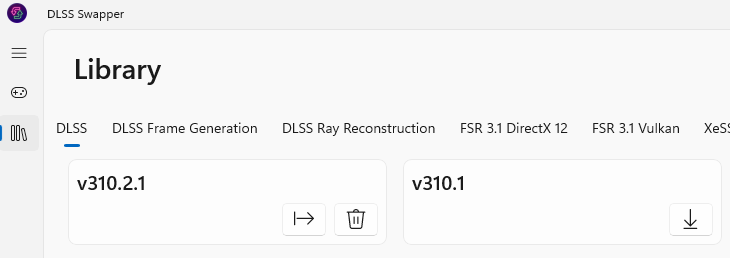
- In the top-left corner, click Library.
Once inside, press Refresh then download the latest versions of the following upscaling files.
Once all downloads are completed, you can close DLSS Swapper.
-DLSS V3.1.0.2
-DLSS FG V3.1.0.2
-FSR DX12 3.1.4
-FSR Vulkan 3.1.4
P.S: Feel free to use the latest versions of the upscaling files released after this guide was published. AMD GPU just install REFramework, replace FSR files to latest version, close your DLSS Swapper and go to step 7 and 8.
DOWNLOAD: DLSS FG Replacement.
https://www.nexusmods.com/site/mods/738?tab=files
-Tweak RTX3000 below to perform Frame Generation, done by injecting AMD's FG function into it.
(We hybrid and enable them, AMD FSR+FG is run by software and can be use universally meanwhile Nvidia DLSS+FG is bound to hardware)
PS: Get the Universal Version.
STEP 4.
- Extract the dlssfg_to_fsr3 (Universal) ZIP file.
Open the dll-version folder, then copy just the dlssg-to-fsr3 files.
Now, paste and replace them along with the latest upscaling files you downloaded earlier
(DLSS, DLSS FG, FSR DX12, FSR Vulkan) all into your Wilds folder.
STEP 5.
Just a little bit more to go. Hang on there Hunters!
DOWNLOAD: Nvidia Profile Investigator. https://github.com/xHybred/NvidiaProfileInspectorRevamped/releases/tag/v3.7
-Software to tweak and apply variety of our Nvidia GPU's option and function.
STEP 6
- Extract and run NVPI-revamped (Portable).
Click top of the Profiles and select MH Wilds.exe.
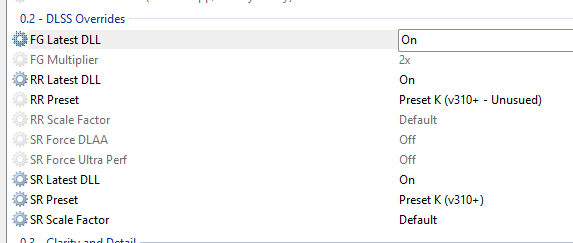
Now scroll to below and look for section 0.2 DLSS Override.
Configure the following option:
-Enable FG latest DLL : ON
-Enable RR Latest DLL : ON
-RR Preset : K V3.10+
-Enable SR latest DLL : ON
-SR Preset : K V3.10+
When everything is set, click APPLY in the top right corner.
Make sure to completely exit both Nvidia Profile Inspector and DLSS Swapper before launching MH Wilds again.
STEP 7.
- My apologies I’m not as familiar with AMD GPUs and I’ve realized I missed an important step for the AMD setup. I’ll update the guide as soon as possible with proper instructions for AMD users. According one of my Steam's friend, an AMD GPU user; he claimed it work for him with just REFramework and without the Optiscaler. Apparently we really need Optiscaler after feedback from others.
In the meantime, I manage to found following YouTube guide on just installing OptiScaler for AMD systems on MH WIlds, please follow just the Optiscaler guide, timestamp start at 01.41 and remainin Optiscaler timestamp.
Download OptiScaler here:
https://github.com/optiscaler/OptiScaler/releases
Youtube Optiscaler Guide:
https://youtu.be/h6_WX69BL2c?si=liGL-QPGqcaJ7wPU
STEP 8.
HAPPY HUNTING HUNTERS!
All this time, CAPCOM had us running on their monster dung tier Crapcom's optimization and NVIDIA hardware bound locked us to DLSS 2 with no Frame Generation in sight but now? Your game’s be running as if slotted with Max Level Flawless Jewel! Fully unlocked with the latest DLSS and Frame Generation enabled too, just like it should on any RTX 4000 or 5000 series GPU.Let’s not forget we’ve also bypassed Crapcom anti-tamper DRM that was tanking performance from the start. If this guide helped, please share it with other hunters and kindly leave a testimonial too so others can finally enjoy a smooth and flawless hunting experience in Monster Hunter Wilds.