

How To Play With More Than 4 Players
 glarmer
(586 ratings)
Jun 17, 2025 @ 9:02am116,973891
Co-opModding or ConfigurationMultiplayerWalkthroughsEnglish
Description

This guide will teach you how to install my mod for larger lobby sizes in PEAK!
Features include:
- Raising the max player limit
- Adding additional marshmallows for your extra climbers
- Adds extra backpacks proportional to number of players (in line with balance of game)
- Fixes the end screen
- Configurable via an in game menu (Press F2) or configuration file
FAQ:
Do achievements work?
- Yes!
Does only the host need this?
- Yes! Only the host needs to install this mod! Other players can optionall install the mod to see a working end screen!
Is the mod safe?
- Yes, you can view the code on github.
Is the mod still working after the most recent update?
- In all likelihood yes - try it before asking. Please report any issues to the github page.
Installation (Automatic - Recommended)
With Thunderstore you can use a variety of Mod Managers to automatically install mods and create profiles.
You have two options:
- Gale: https://github.com/Kesomannen/gale/releases
- R2ModMan: https://github.com/ebkr/r2modmanPlus/releases
Once you have these installed, you can use them to search the Thunderstore for mods, create a profile or use the default profile, search for PEAK Unlimited and press install. To play modded you then have to press play on the mod launcher - launching with Steam will load vanilla.
You have two options:
- Gale: https://github.com/Kesomannen/gale/releases
- R2ModMan: https://github.com/ebkr/r2modmanPlus/releases
Once you have these installed, you can use them to search the Thunderstore for mods, create a profile or use the default profile, search for PEAK Unlimited and press install. To play modded you then have to press play on the mod launcher - launching with Steam will load vanilla.
Installation (Manual - Not Recommended)
Download
https://thunderstore.io/c/peak/p/glarmer/PEAK_Unlimited/
Only the host needs to install this mod!
Manual Install
1.) Download Bepinex from here
https://thunderstore.io/c/peak/p/BepInEx/BepInExPack_PEAK/
2.) Extract the contents of that zip into your game directory (default: C:\Program Files (x86)\Steam\steamapps\common\PEAK) resulting in a folder that has the following files:
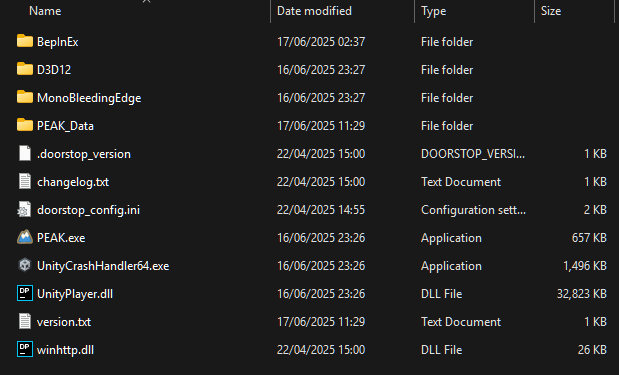
3.) Start the game and close it again, this does the first time set up for BepInEx.
This creates the bepinex/plugins folder, it is necessary
- If you are on linux add the startup command: WINEDLLOVERRIDES="winhttp=n,b" %command%
4.) Download the mod from here (Click Manual Download): https://thunderstore.io/c/peak/p/glarmer/PEAK_Unlimited/
5.) Open the downloaded zip file. Copy and paste the PeakUnlimited.dll file into your PEAK directory - (steam directory)\PEAK\BepInEx\plugins. All the other files can be ignored.
If you don't have a plugins folder, you either need to do step 3, or your bepinex installation is incorrect.
6.) Run the game
Configuration
- Configuration can be found at: (steam directory)\PEAK\BepInEx\config\PeakUnlimited.cfg
https://thunderstore.io/c/peak/p/glarmer/PEAK_Unlimited/
Only the host needs to install this mod!
Manual Install
1.) Download Bepinex from here
https://thunderstore.io/c/peak/p/BepInEx/BepInExPack_PEAK/
2.) Extract the contents of that zip into your game directory (default: C:\Program Files (x86)\Steam\steamapps\common\PEAK) resulting in a folder that has the following files:
3.) Start the game and close it again, this does the first time set up for BepInEx.
This creates the bepinex/plugins folder, it is necessary
- If you are on linux add the startup command: WINEDLLOVERRIDES="winhttp=n,b" %command%
4.) Download the mod from here (Click Manual Download): https://thunderstore.io/c/peak/p/glarmer/PEAK_Unlimited/
5.) Open the downloaded zip file. Copy and paste the PeakUnlimited.dll file into your PEAK directory - (steam directory)\PEAK\BepInEx\plugins. All the other files can be ignored.
If you don't have a plugins folder, you either need to do step 3, or your bepinex installation is incorrect.
6.) Run the game
Configuration
- Configuration can be found at: (steam directory)\PEAK\BepInEx\config\PeakUnlimited.cfg
Important
- DO NOT UNDER ANY CIRCUMSTANCE COMPLAIN ABOUT BUGS TO THE DEVELOPERS WHILE USING MODS. UNINSTALL MODS IF YOU ENCOUNTER BUGS AND THEN REPORT THEM IF THEY ARE STILL PRESENT.
- Always check the steam discussions first if you experience a bug, it seems the game has a few common issues that are unrelated to the mod and you may find a solution there.
- Try swapping between DX12 and Vulkan if you are having issues. Personally I find DX12 to work best.
- Always check the steam discussions first if you experience a bug, it seems the game has a few common issues that are unrelated to the mod and you may find a solution there.
- Try swapping between DX12 and Vulkan if you are having issues. Personally I find DX12 to work best.
End
If you like my mod, please feel free (but not obiged) to give this guide a positive rating, or a star on github or an upvote on the thunderstore. If you feel really generous you can make a contribution to my Ko-fi here[ko-fi.com].
Have fun climbing!!!!!!
Have fun climbing!!!!!!
Media
If you have cool photos and videos let me know, I will post my favourites and link some of the others
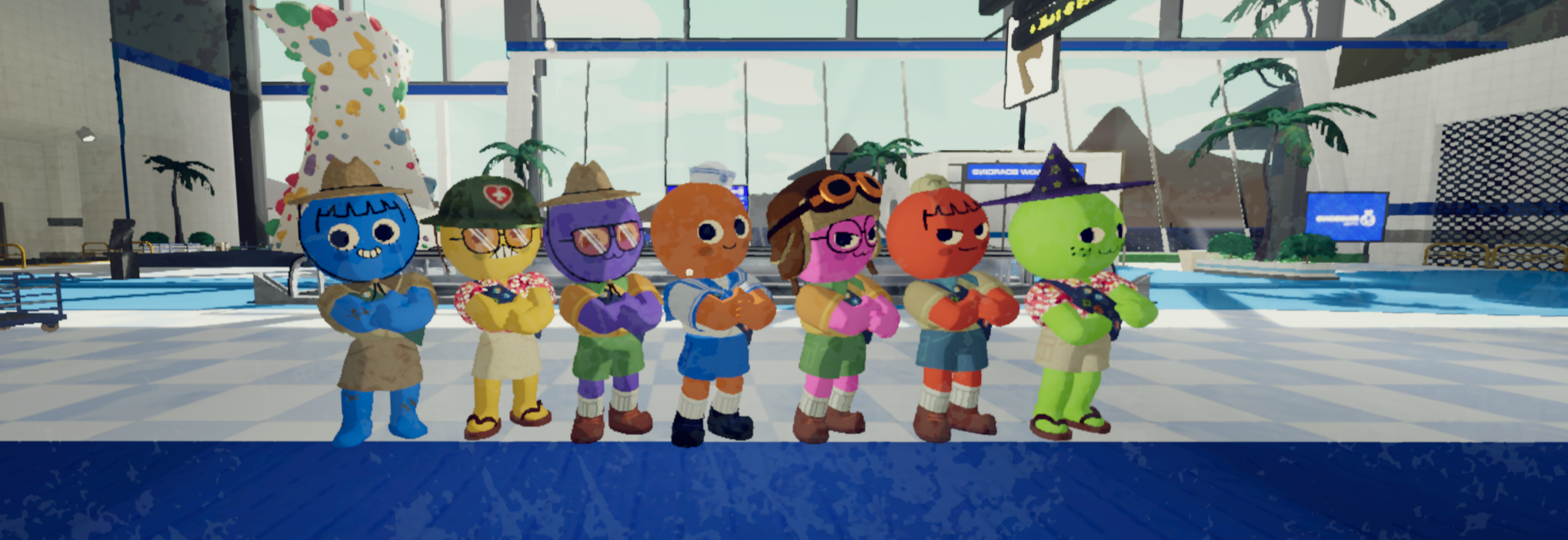
Check out The Yogscast playing here: https://youtu.be/qvD8aKm7lH8
Check out The Yogscast playing here: https://youtu.be/qvD8aKm7lH8
My Other Mods
PEAK Unbound: https://thunderstore.io/c/peak/p/glarmer/PEAK_Unbound/
Allows for you to rebind your keys via a config file
Voice Volume Saver: https://thunderstore.io/c/peak/p/glarmer/PEAK_Voice_Volume_Saver/
This saves the volume of your friends between games so you don't have to reset it frequently
Allows for you to rebind your keys via a config file
Voice Volume Saver: https://thunderstore.io/c/peak/p/glarmer/PEAK_Voice_Volume_Saver/
This saves the volume of your friends between games so you don't have to reset it frequently