

How to DEFINITIVELY open LAD:PYIH (And how to fix it not opening)
 SFC
SFC(55 ratings)
Feb 20, 2025 @ 11:36am1,4583
Game ModesWalkthroughsEnglish
Step One: Install the game
To play the game, you will need to install it first.
After buying the game go to your Steam Library and click on the game, then press the INSTALL button and install it on whatever hard drive you want (if it has enough space.)
After buying the game go to your Steam Library and click on the game, then press the INSTALL button and install it on whatever hard drive you want (if it has enough space.)
Step Two: Opening the game
This is the main step.
After fully installing the game, go to your steam library again and click on the game, after that you can click the big PLAY button.
 You can also right click the game in your steam library and then click 'Manage' and then 'Browse Local Files' and find the games startup.exe file (runtime > media > startup.exe) and open it from there.
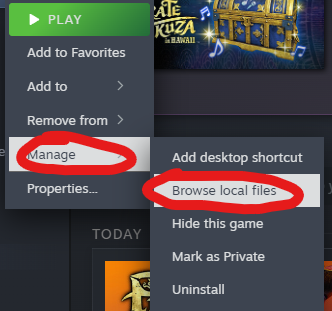

After fully installing the game, go to your steam library again and click on the game, after that you can click the big PLAY button.
You can also right click the game in your steam library and then click 'Manage' and then 'Browse Local Files' and find the games startup.exe file (runtime > media > startup.exe) and open it from there.
Extra: Potential Problems
There are some things that can stop the game from launching.
From what I'm currently aware, there's only one fix for this.
Go to your local files again (explained in step two) and delete a file named "nvngx_dlss.dll".
Source: https://steamcommunity.com/app/3061810/discussions/0/591763775031406505/
From what I'm currently aware, there's only one fix for this.
Go to your local files again (explained in step two) and delete a file named "nvngx_dlss.dll".
Source: https://steamcommunity.com/app/3061810/discussions/0/591763775031406505/