100% Achievement Guide - Wallpaper Engine (2026)
 Blahaj.exe
(66 ratings)
Sep 5, 2025 @ 11:31am2,24777
AchievementsWalkthroughsEnglish
Introduction
To anyone using this guide here is some useful information and, thank you for taking the time to read this guide and I hope it was useful too you.
 Please consider leaving a like, a comment (or even a favorite) if this guide helped you in any way. Finally enjoy that +1 Perfect Game on your Steam account! :3
Anyway, thanks for reading! <3
- Total Achievements:
- 17 - Hidden Achievements:
- 0 - Buggy Achievements:
- 0 - Estimated Completion Time:
- 1-5 Hours - DLC Required:
- No
Please consider leaving a like, a comment (or even a favorite) if this guide helped you in any way. Finally enjoy that +1 Perfect Game on your Steam account! :3Anyway, thanks for reading! <3
:3
For these 17 achievements, I've put them into four groups:
We'll start with...
- Posts
- High aspirations
- Video makers
- The internet on a disk
- Press any key
- Sharing is caring - Hidden
- Pest
- k0n4m1 - Creation
- Creativity according to instructions
- Working with 3D models - Wallpapers
- Keeping an eye on this one
- Trying something new
- Getting the hang of it
- Hard to pick just one
- Out of disk space
We'll start with...
「」Posts
 High aspirations:
 Post a scene wallpaper to workshop
Go into the wallpaper editor on the bottom left of the app and then press "create wallpaper". Find any picture for your wallpaper and open it, press ok. Top left TAB there will be an option that says "Workshop". Press it and then click "Share Wallpaper on Workshop" you should have the achievement.
 Video makers:
 Post a video wallpaper to workshop
Go into the wallpaper editor on the bottom left of the app and then press: create wallpaper. Now find a random .mp4 file and open it, press ok. Now on the top left navigation bar there will be an option that says workshop. Press it and then click share wallpaper on workshop. Add a title and a preview image and press publish and you should have the achievement! :D
 The internet on a disk:
 Post a web wallpaper to workshop
Go into the wallpaper editor on the bottom left of the app and then press, create wallpaper. Meanwhile open up notepad and save it as an html file. For example name it, internet.html Don't forget to change the save as type to: all files. Now back in wallpaper engine your file explorer will have opened one you've pressed create wallpaper. Now find your saved html file and open it. Press ok and lastly on the top left navigation bar there will be an option that says workshop. Press it and then click share wallpaper on workshop. Add a title and a snapshot and then press publish. Now you should have the achievement!
 Press any key:
 Post an app wallpaper to workshop
Go into the wallpaper editor on the bottom left of the app and then press: create wallpaper. Meanwhile open up notepad and save it as an .exe file. For example name it: app.exe Don't forget to change the save as type to: all files. Now back in wallpaper engine your file explorer will have opened one you've pressed create wallpaper. Now find your saved .exe file and open it. Press ok. And lastly on the top left navigation bar there will be an option that says workshop. Press it and then click share wallpaper on workshop. Add a title and a snapshot and then press publish. And you should have the achievement. :)
 Sharing is caring:
 Post a Steam screenshot with a workshop wallpaper open
For some reason I wasn't able to just figure this out on my own because "F12" (by default) wouldn't work for me. Turns out there's an option to screenshot in your icon tray that should work.
「」Hidden
 Pest:
Pest: Cause 1 fatal error OR trigger 128 warnings in the editor
- Press "Open background" at the bottom of the app window
- Select "... from URL"
- Enter '1' in URL and press OK or enter.
- Do steps 1-3 the same way, but enter '2' as next URL.
- Repeat until you get achievement.
NOTE: Use any macro application to do it faster and in automatic way.
 k0n4m1:
 30 lives
Navigate to Settings, then to About and when you press the up arrow key, the window will bobble a little bit to indicate your input has been accepted.
Input using the keyboard (Up - Up - Down - Down - Left - Right - Left - Right - B - A - Enter).
The window should do a little flip and display this message at the bottom right of the window as long as you entered the code fast enough:
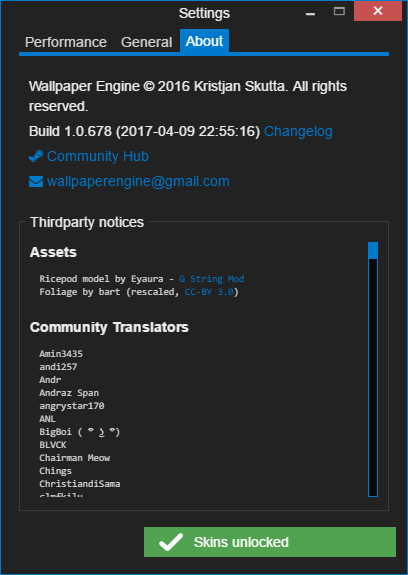
「」Creation
 Creativity according to instructions:
 Use a 2D scene template
Open Wallpaper Engine, then select the option "Wallpaper Editor" - You can also open the editor by right-clicking the icon in the taskbar and choosing "Create Wallpaper".
The editor will appear and click on "Use a Template".
Then select the option "2D Scene" & enter a project name.
Clicking "Ok" will load the 2-D project and the achievement will unlock!
 Working with 3D models:
 Use a 3D scene template
Open Wallpaper Engine, then select the option "Wallpaper Editor" - You can also open the editor by right-clicking the icon in the taskbar and choosing "Create Wallpaper".
The editor will appear and click on "Use a Template".
Then select the option "3D Scene" & enter a project name.
Clicking "Ok" will load the 3-D project and the achievement will unlock!
「」Wallpapers
 Keeping an eye on this one:
 Favorite 10 different wallpapers from Workshop
Go to the workshop screensavers, click on them, and click on the heart icon in the side panel with information.
This achievement didn't auto pop-up for me, I had to close the program first.
 Trying something new:
 Use 10 different wallpapers from Workshop
Download 10 different wallpapers from the Steam Workshop.
 Getting the hang of it:
 Use 25 different wallpapers from Workshop
Download 25 different wallpapers from the Steam Workshop.
 Hard to pick just one:
 Use 50 different wallpapers from Workshop
Download 50 different wallpapers from the Steam Workshop.
 Out of disk space:
 Use 100 different wallpapers from Workshop
Download 100 different wallpapers from the Steam Workshop.
Thank you for reading :3
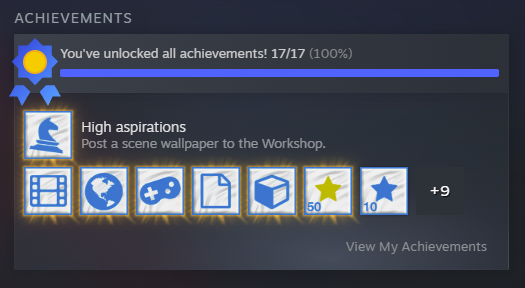
If you guys/gals finish this game let me know in the comments, heres my proof :3