

Uninstallation guide.
 miltoid19_cat
(165 ratings)
Dec 5, 2024 @ 1:06pm11,489313
Gameplay BasicsMultiplayerSecretsWalkthroughsEnglishUninstallAnti-CheatAnti Cheat
Hotfix Dec 6th
Seems that the developers changed the uninstall script it does now also uninstall the services.
No need to run the script any more, but I will leave it up just in case anyone needs it.
In theory, it should work with any game that has the same problem of not uninstalling the "AntiCheatExpert" software.
I will leave the guide up just in case someone needs it in the future
No need to run the script any more, but I will leave it up just in case anyone needs it.
In theory, it should work with any game that has the same problem of not uninstalling the "AntiCheatExpert" software.
I will leave the guide up just in case someone needs it in the future
Manual uninstalation
Here, you will need to simply run cmd as an administrator.
Press on the windows button, then input CMD and hit run as administrator
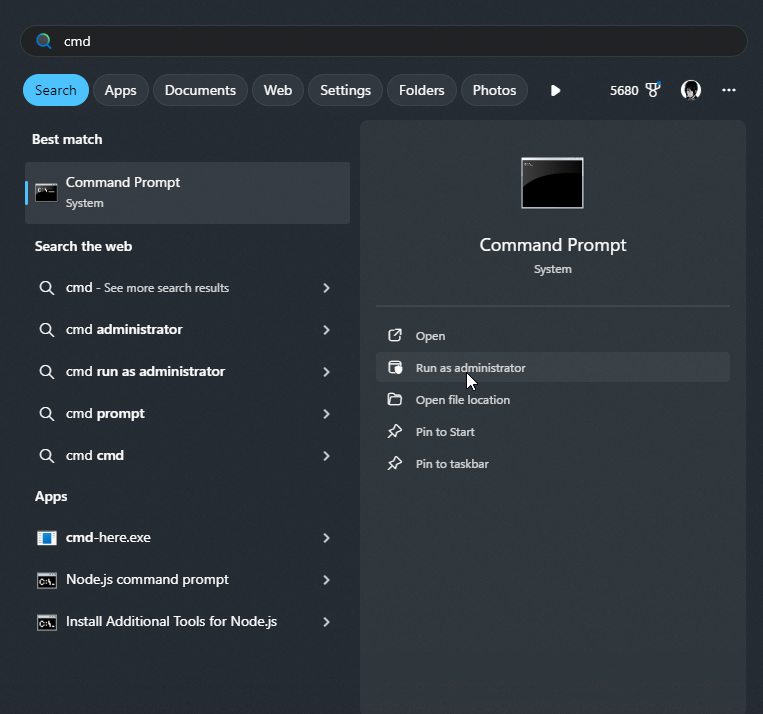
Then, hit "Yes" on the pop up and paste the commands as shown bellow:
If yes restart your pc and run the commands again
Finally, after running the commands after the restart navigate delete the following folders
C:\Program Files\AntiCheatExpert
C:\ProgramData\AntiCheatExpert
ACE-BASE.sys in C:\Windows\System32\drivers
Press on the windows button, then input CMD and hit run as administrator
Then, hit "Yes" on the pop up and paste the commands as shown bellow:
sc delete ACE-GAME
sc delete ACE-BASE
sc delete "AntiCheatExpert Service"
sc delete "AntiCheatExpert Protection"
Then run the commands: sc query ACE-BASE
sc query "AntiCheatExpert Service"
check if you have any kind of output.If yes restart your pc and run the commands again
Finally, after running the commands after the restart navigate delete the following folders
C:\Program Files\AntiCheatExpert
C:\ProgramData\AntiCheatExpert
ACE-BASE.sys in C:\Windows\System32\drivers
Automatic magic
I made a small script to help you uninstall the command
You just need to make a new text document, paste the code segment and then "save us" in teh pop ap change the "Save as type" to all files (''.") and then name it whatever you wan as long as it ends with "xx.bat"
Simply run it and it will uninstall the Anti Cheat protection.
If you have any questions about the code please ask me! I will be glad you let you know how it works.
You just need to make a new text document, paste the code segment and then "save us" in teh pop ap change the "Save as type" to all files (''.") and then name it whatever you wan as long as it ends with "xx.bat"
@echo off
:: Check if running as administrator
net session >nul 2>&1
if %errorlevel% neq 0 (
echo This script requires administrative privileges to delete the services and files.
echo Please accept the permissions prompt to proceed.
powershell -Command "Start-Process '%~0' -Verb RunAs"
echo If you declined the permissions prompt, the script cannot continue.
pause
exit /b
)
:: Deleting services
echo Checking and deleting services...
sc delete ACE-GAME
sc delete ACE-BASE
sc delete "AntiCheatExpert Service"
sc delete "AntiCheatExpert Protection"
:: Check if services are running
echo Checking if ACE-BASE and AntiCheatExpert Service are still running...
sc query ACE-BASE | findstr /i "STATE" | findstr /i "RUNNING" >nul
set ACE_BASE_RUNNING=%errorlevel%
sc query "AntiCheatExpert Service" | findstr /i "STATE" | findstr /i "RUNNING" >nul
set ANTICHEAT_SERVICE_RUNNING=%errorlevel%
if %ACE_BASE_RUNNING% neq 0 if %ANTICHEAT_SERVICE_RUNNING% neq 0 (
echo Both services are not running. Proceeding to delete folders and files...
:: Delete folders
echo Deleting folder: C:\Program Files\AntiCheatExpert
rmdir /s /q "C:\Program Files\AntiCheatExpert"
echo Deleting folder: C:\ProgramData\AntiCheatExpert
rmdir /s /q "C:\ProgramData\AntiCheatExpert"
:: Delete file
echo Deleting file: C:\Windows\System32\drivers\ACE-BASE.sys
del /f /q "C:\Windows\System32\drivers\ACE-BASE.sys"
echo All specified folders and files have been deleted.
) else (
echo One or more services are still running. Please restart your pc and run the this file again.
)
pause
Simply run it and it will uninstall the Anti Cheat protection.
If you have any questions about the code please ask me! I will be glad you let you know how it works.